
Participating Frequently
March 13, 2018
Question

Photoshop suddenly only displays generic adjustment symbol in layer palette

  • March 13, 2018
  • 3 replies
  • 3398 views

Hi there,

I have a subscription for the Adobe CC Master Collection, and worked quite a lot with photoshop. Today, when an update of several applications in the suite was done, all of a sudden the icons for the adjustments in the layer palette have changed to the generic adjustment symbol, while before they displayed the individual icon for the specific adjustment for that layer.

I found a peculiarity - when I enlarge the thumbnails in the palette to "medium" size, the specific symbols are displayed properly - but when I switch back to "small" thumbnails (as I have always used) - the icons again become generic. I have provided a couple of images for illustration.
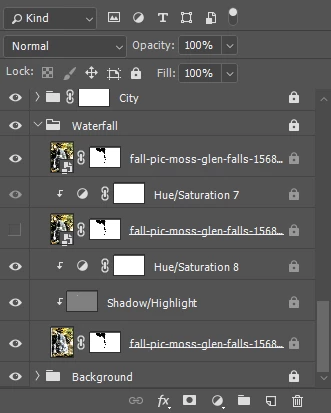
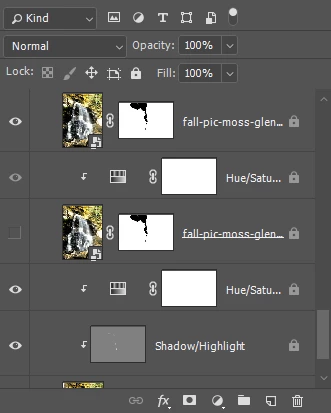
 

I hope this can be resolved as I am not happy for using those bigger thumbnails taking up too much space, as I typically work with pictures with a quite substantial number of layers.

In the meantime, I'm now reverting to the previous version - hoping that it still works as before.

Thanks in advance. Best regards.

This topic has been closed for replies.

3 replies

lhummelAuthor
Participating Frequently
March 13, 2018

I have now tried to completely uninstall Photoshop, removing any personal settings etc. and reinstalling the 19.1.1 version - to no avail; it still behaves the same.

Quite unacceptable that Adobe doesn't do a decent job of testing out the consequences of their updates before sending them out; we are not speaking about cheap products but premium high-end products with high end pricing. There shouldn't be such flaws in the updates they send out.

davescm
Community Expert
Community Expert
March 13, 2018

Hi

I see exactly the same as you in CC version 19.1.2 on Windows 10.
Layer size options "none" or "small" show the generic icon , "medium" and "large" show the specific adjustment icons.

I use three monitors , each 1920 x 1080 and have Windows UI scaling set to 100%

A preference reset makes no difference

Dave

lhummelAuthor
Participating Frequently
March 13, 2018

Exactly; I just tried to make a system restore (it turned out that my system had generated an automatic restore point few days ago). But even that didn't help.

Trevor.Dennis
Community Expert
Community Expert
March 13, 2018

It sounds like something broken.  As with Johan, I see the proper icons with all thumb sizes other than none.   With things like that, you'd probably be best to go straight to a Preference reset, and if that fails, a reinstall.

I am wondering if they have changed the UI in recent versions?  I use three screens with the outer two set in portrait mode, as it lets me have full length panels.  I am sure there used to be a limit, but Layers and History will now overflow the available screen area (1920 pixels)

[EDIT]  FYI I am also using Windows 10 and the most recent version

JohanElzenga
Community Expert
Community Expert
March 13, 2018

What version of Photoshop? My version (19.1.1 for Mac) still shows the specific thumbnails when I set the size to small. Only when I set it to 'none' they become generic.

-- Johan W. Elzenga
lhummelAuthor
Participating Frequently
March 13, 2018

Hello, thanks for the quick response.

Sorry, I forgot to mention that I'm working on the Windows version - with Windows 10. The Photoshop update was ver. 19.1.2

An update: I have now reverted to the 19.1.1 - and it seems to work as expected again - at least for new documents; however, when I open existing Photoshop documents, the adjustment layers are now shown with the generic symbol - very annoying