

robertk69602476
Participant
April 4, 2019
Answered

photoshop symmetry tool isn't available

  • April 4, 2019
  • 2 replies
  • 7887 views

hi, I need some help from you guys,

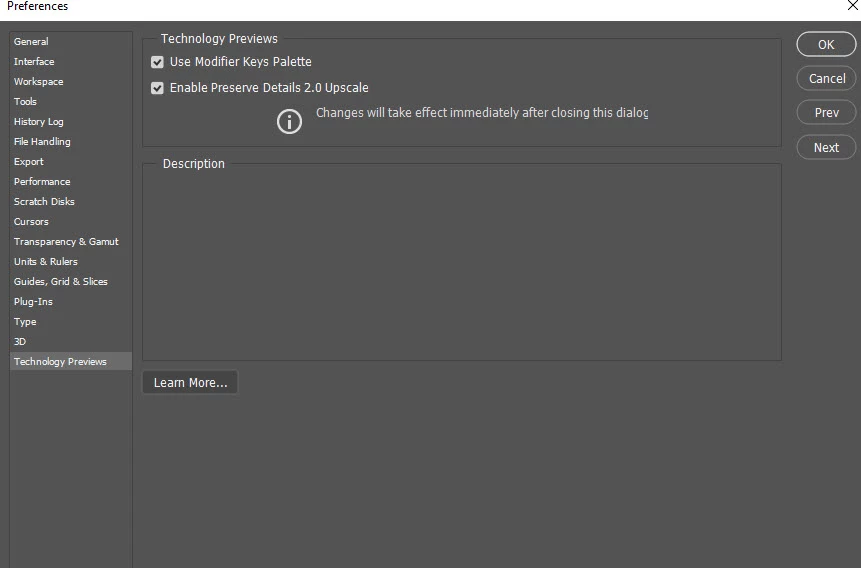
In my latest version of Adobe Photoshop CC I can not use a symmetry tool. it is not even possible to enable it from edit/prefferences/technologypreviews. I have reinstall photoshop but no cuccess..  Can anybody help me please? I do regularly update all CC applications..
    This topic has been closed for replies.
    Correct answer Akash Sharma

    Hi robertk69602476,

    Could you please take a look a the below article and let us know if that helps?

    Paint symmetrical patterns in symmetry mode

    How to use Paint Symmetry in Photoshop CC 2019

    Thanks,

    Akash

    2 replies

    April 4, 2019

    Hi

    With the brush tool selected have you checked the options bar

    robertk69602476
    Participant
    April 4, 2019

    thanks for answer. I had only took a pencil and ther it is, it appeared on the top bar menu. I just found that fature today on youtube chanel, where it is said to enable that feature from prefferences menu. As I didn't find it there I do all unnecesery thinks before try to get pencil toll... like I am stupido   thanks anyway

    April 4, 2019

    Hi

    That option was removed from preferences, although I can't remember from which update it happened

    Akash Sharma
    Akash SharmaCorrect answer
    Legend
    April 4, 2019

    Hi robertk69602476,

    Could you please take a look a the below article and let us know if that helps?

    Paint symmetrical patterns in symmetry mode

    How to use Paint Symmetry in Photoshop CC 2019

    Thanks,

    Akash