Copy link to clipboard
Copied
Hi,
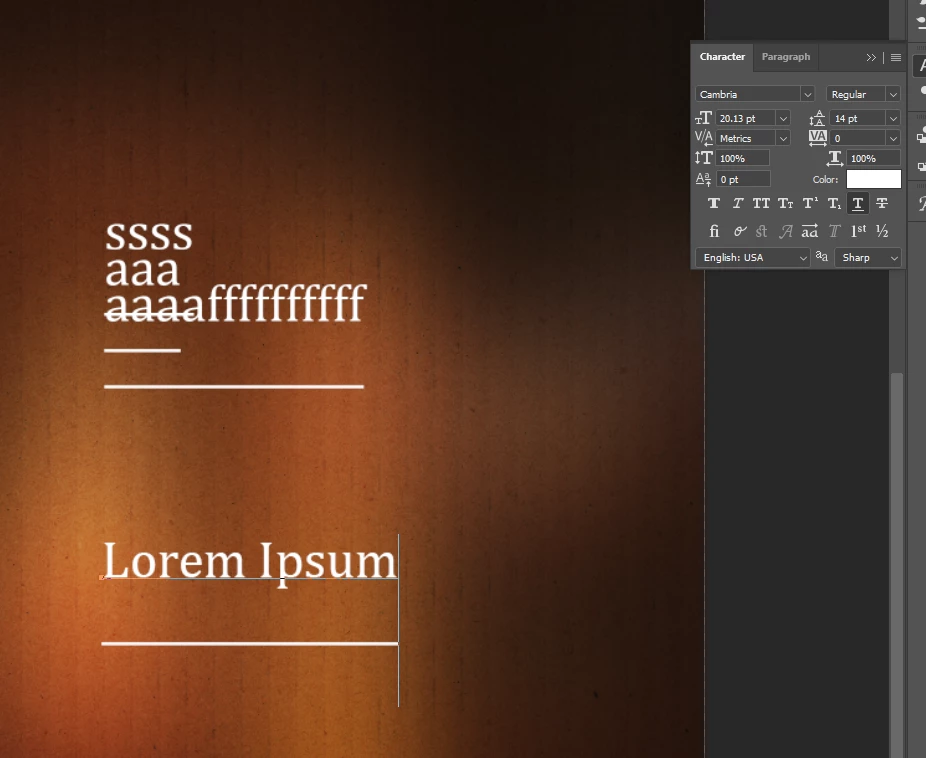
I do not know how this happened, but the cursor for my Type tool has become too big, and it's affecting the text as well, (screenshot attached), the underlining goes somewhere else away from teh text. I've tried resetting the Type tool, and my Baseline shift is set to zero and it's still there. Please help T__T
Copy link to clipboard
Copied
I think this may be a feature of that particular font. When something is editable text the extra space is left for any special charaacters and ligatures, so it always has some space. Here's a screenshot where I used the same font and settings and had exactly the same look, and another font picked randomly that has less space.
 
Copy link to clipboard
Copied
Can you try Ctrl+A to select all of the text, then look again in the Character panel? If any text box is blank (such as leading), there is a mixture. Also check for Superscript and Subscript. You might also look at the Paragraph panel at the spacing controls.
Jane
Get ready! An upgraded Adobe Community experience is coming in January.
Learn more