Salir
  • Comunidad global
    • Idioma:
      • Deutsch
      • English
      • Español
      • Français
      • Português
  • 日本語コミュニティ
  • 한국 커뮤니티

Photoshop text: Weird spacing between characters - How to fix?

Nuevo aquí ,
Jan 30, 2013 Jan 30, 2013

Hi,

I bought Design & Web premium (NL), and I have a question about the spacing between characters in Photoshop, does someone now how to fix it? To show it's not a font-problem i used Verdana, Arial and now Tahoma, all with the same problems........I checked, all the text spacing is 0.

photoshop-spacing-problem.PNG

Can someone help me with this?

Thanks in advance!

By the way: sorry for my bad English..... : )

32.8K
Traducir
Informe
Directrices de la comunidad
Sé amable y respetuoso, muestra títulos de crédito de la fuente de contenido original y busca duplicados antes de publicar. Más información
community guidelines

correct answers 1 respuesta correcta

Explorador , Jan 30, 2013 Jan 30, 2013

Hi,

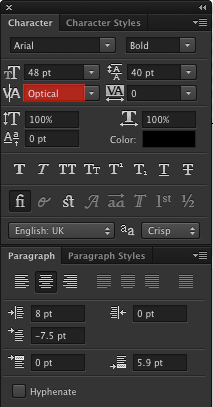
Try changing kerning from Metric to Optical.

Optical.jpg


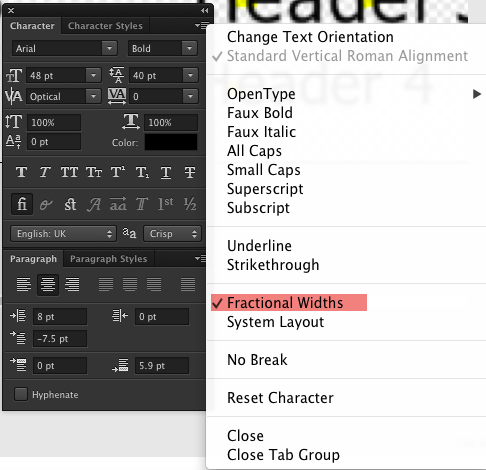
Another option is to switch off Fractional Widths.

Fractional-Widths.jpg

Can you make the PSD available for download?

Hope this helps 🙂

Traducir
Adobe
Explorador ,
Jan 30, 2013 Jan 30, 2013

Hi,

Try changing kerning from Metric to Optical.

Optical.jpg


Another option is to switch off Fractional Widths.

Fractional-Widths.jpg

Can you make the PSD available for download?

Hope this helps 🙂

Traducir
Informe
Directrices de la comunidad
Sé amable y respetuoso, muestra títulos de crédito de la fuente de contenido original y busca duplicados antes de publicar. Más información
community guidelines
Nuevo aquí ,
Jan 30, 2013 Jan 30, 2013

Thanks, that did the trick!

Traducir
Informe
Directrices de la comunidad
Sé amable y respetuoso, muestra títulos de crédito de la fuente de contenido original y busca duplicados antes de publicar. Más información
community guidelines
Explorador ,
Oct 19, 2017 Oct 19, 2017

This still applies in oct 2017

Sidenote: turning ON 'fractional widths' resolved the problem. Thanks a lot, this has been bothering me for a long time and I never even knew of the existence of this option. Still don't know what it's for but it works

Traducir
Informe
Directrices de la comunidad
Sé amable y respetuoso, muestra títulos de crédito de la fuente de contenido original y busca duplicados antes de publicar. Más información
community guidelines
Nuevo aquí ,
Dec 17, 2017 Dec 17, 2017

Same here. Its sooooo bad in Photoshop. Idk how to fix this and its very frustrating. Anyone know why or how to fix?

Traducir
Informe
Directrices de la comunidad
Sé amable y respetuoso, muestra títulos de crédito de la fuente de contenido original y busca duplicados antes de publicar. Más información
community guidelines
LEYENDA ,
Jan 30, 2013 Jan 30, 2013

It could be helpful to describe exactly how you created the text you're showing here.  Is it upscaled from a smart object? 

I ask because it's also fuzzier than it ought to be, implying it's been rasterized at some point.

Edit:  Never mind, I see I'm too slow.

-Noel

Traducir
Informe
Directrices de la comunidad
Sé amable y respetuoso, muestra títulos de crédito de la fuente de contenido original y busca duplicados antes de publicar. Más información
community guidelines
Nuevo aquí ,
Feb 19, 2021 Feb 19, 2021
MÁS RECIENTES

Pedro5C19_0-1613770930262.png

Assign this option in paragraph menu. It worked for me.

Traducir
Informe
Directrices de la comunidad
Sé amable y respetuoso, muestra títulos de crédito de la fuente de contenido original y busca duplicados antes de publicar. Más información
community guidelines