
Benjamin91
Participant
March 18, 2021
Question

Photoshop thinks my external scratch disk is same size as my local drive

  • March 18, 2021
  • 5 replies
  • 1470 views

I haven't found anyone else online experiencing this particular issue with scratch disks. Hope someone can help.


I have approx 300gb free space on my external drive, and am using it as a scratch disk. Now Photoshop tells me the scratch disk is full, and when I see the list of disks available, it shows *exactly* the same free space on the external drive, as my local drive (also on another partition).
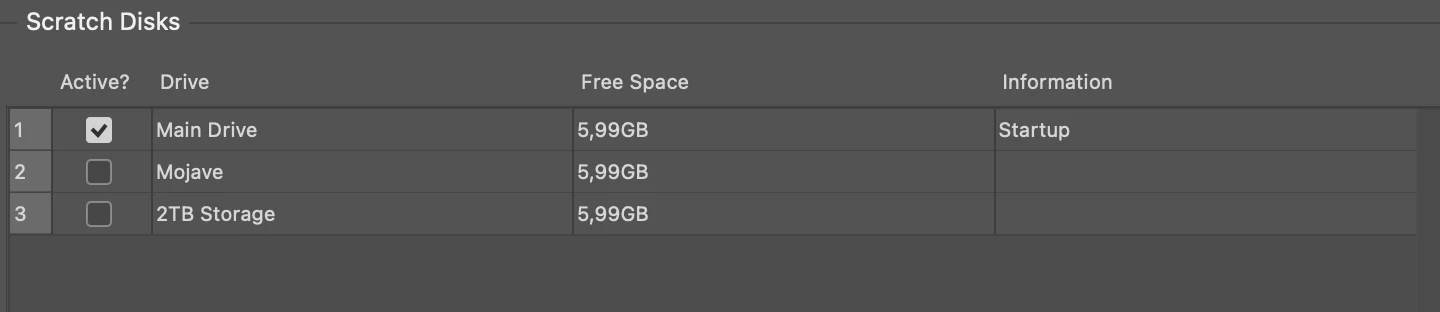


I have tried,

Rebooting the mac and Photoshop,

Reinstalling Photoshop both with saving my settings, and a complete clean reinstall all settings deleted,

Running first aid on the drive,

Restarting the drive,


Nothing helps.

This topic has been closed for replies.

5 replies

Inspiring
August 28, 2024

Did you ever find a solution? This happened to me out of nowhere after never having this problem and it has to be the most frustrating issue ive had with adobe. 


silk-m
Community Expert
Community Expert
August 28, 2024

Is it a different device?
Perhaps it's a different volume on the same device (Container).


APPLE SSD AP1024R Media, Conteiner disk3


CT1000P2SSD8 Media, Conteiner disk7


Different volumes of the same container share free space and will be the same size.

--Susumu Iwasaki
Inspiring
August 28, 2024

 This bug with Adobe happened infront of my eyes out of nowhere for 1st time after using photoshop daily for 5 years. I always use Lacie External Drives with over 4-5TB of free space checked on my scratch disk settings (as shown on drive settings in photo) Was using photoshop with no issues, computer died, turned it back on, when to make sure my external drive was checked per usual, now this new irritating bug shows the external drive with the only space available as my internal drive 

Participant
May 1, 2024
  1. having this same problem for over a year now, has anyone found a solution?
Participating Frequently
May 1, 2024

Still the same for me , 1-2 years like this. I'm just looking forward to the moment I'll have a new laptop and I will use a brand new SSD card. THAT is my only hope, I tried everything.

Participating Frequently
July 18, 2023

I have the same issue. My external Drive has 500 GB! yet I still get Scratch disk Full Error and when I check it shows the same amount of space in both internal memory and external drive. I have updated OS, deleted PS, reinstalled. Still the same for a year now..

D Fosse
Community Expert
Community Expert
January 7, 2022

Make sure the other disks are correctly formatted (APFS or HFS+) - not exFAT which doesn't work well in later MacOS versions.

PECourtejoie
Community Expert
Community Expert
January 10, 2022

Hello, also ensure that you give permissions to Photoshop to access the other drives.

By settings, do you mean the preferences? 

JJMack
Community Expert
Community Expert
March 18, 2021

It looks like Photoshop is having issues with your Mac system. I find it hard to believe all you disk have exactly the same amount of free space. Make sure you have address all the Mac related issues with Photoshop.

JJMack
Benjamin91
Participant
April 9, 2021

Can you explain youself clearer? This answer gives me no clue as to what you are suggesting.

Participant
January 7, 2022

I also am having the same issue - did you ever find a solution?