
Participating Frequently
November 12, 2024
Question

Photoshop Timeline preview resolution doesn't change

  • November 12, 2024
  • 2 replies
  • 393 views

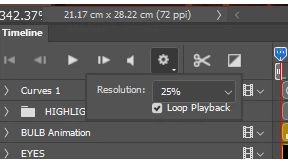
In Photoshop's Timeline, there's an option to chose the resolution of the playback preview.
It can be set to 100% or 50% or 25%.
However, it's been a few updates now that this resolution option doesn't work. Photoshop now only previews at 100%, even when choosing 50% or 25%. This can slow down the playback speed.
This topic has been closed for replies.

2 replies

Sykosan-Author
Participating Frequently
November 13, 2024

@Mohit Goyal 
Thanks for the reply and the link.
I knew of this problem, but it's not the same.
This is different and I also use the latest version of Photoshop.

Sykosan-Author
Participating Frequently
November 19, 2024

I just updated to the latest 26.1 and the timeline's resolution setting is still not working properly. It always renders at 100% resolution. 

Mohit Goyal
Community Manager
Community Manager
November 12, 2024

Hi there,


We're sorry for the trouble. Are you using the Photoshop 26.0 version? We had a bug for somewhat related and got resolved in Photoshop 25.12 version. Here's the community conversation for the same: https://adobe.ly/40HIAOA


Please update Photoshop to it's latest version and let us know how it goes for you.

Thanks,

Mohit

Sykosan-Author
Participating Frequently
November 19, 2024

I just updated to the latest 26.1 and the timeline's resolution setting is still not working properly. It always renders at 100% resolution.