Participant
February 4, 2022
Answered

Photoshop too small

  • February 4, 2022
  • 2 replies
  • 2277 views

Cannot find any settings, that would help me with this problem. Everything is just so small on my screen, imma need to look for a real magnifying glass. Im using Microsoft Book. Any ideas?

This topic has been closed for replies.
Correct answer Ged_Traynor

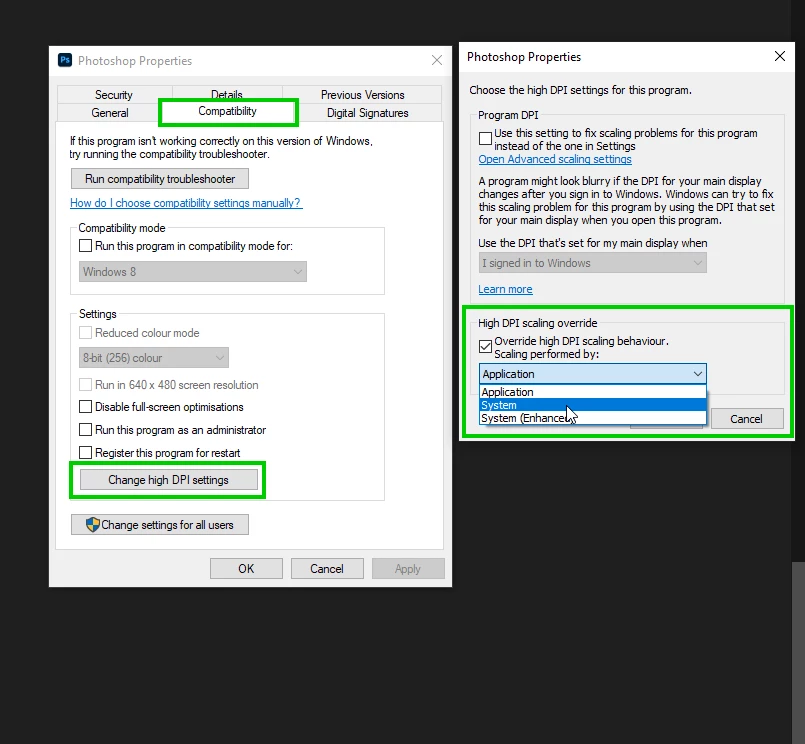
Try right clicking on the Photoshop.exe or Photoshop Shortcut and adjust the DPI settings as per below, select System from the drop down menu
2 replies

Ged_Traynor
Community Expert
Ged_TraynorCommunity ExpertCorrect answer
Community Expert
February 4, 2022

Try right clicking on the Photoshop.exe or Photoshop Shortcut and adjust the DPI settings as per below, select System from the drop down menu

Participant
February 5, 2022

Lovely! Thank you very much

Ged_Traynor
Community Expert
Community Expert
February 5, 2022

You're welcome 🙂

Mylenium
Legend
February 4, 2022

Older versions of Photoshop do not support High-DPI screens. You need to change the display resolution in the system settings.


Mylenium
