Participant
March 5, 2020
Answered

Photoshop tools extra click glitch

  • March 5, 2020
  • 5 replies
  • 1665 views

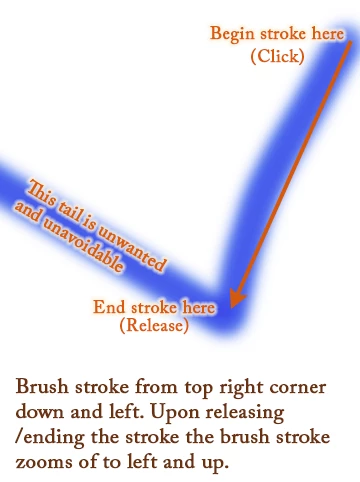
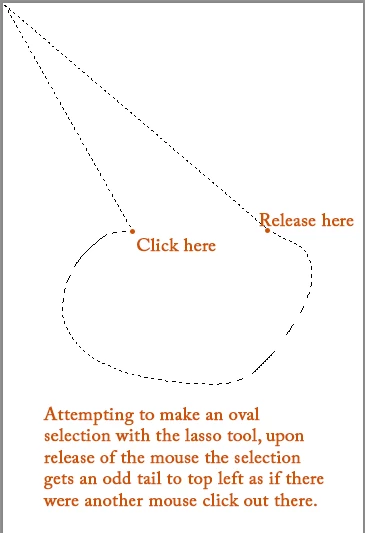
Tools are behaving as though there is an extra click after releasing the mouse. Selection tools, including the patch tool (but not rectangle or oval), brush/pencil/eraser... all make an extra selection, or stroke, upon release of the mouse. I have removed and reinstalled Photoshop without any change.

Captures:
This topic has been closed for replies.
Correct answer majorscribbler

If it is just a Windows 7 issue then I will be able to get past it when I upgrade Windows 10 then. That's good to know. Really good. Thank you.

5 replies

Participant
August 17, 2020

Ill also mention that this glitch doesn't happen right away, and if I close and reopen photoshop it seems to fix the issue for a little while before it comes back.

Participant
August 17, 2020

I seem to be having this glitch. I just upgraded to windows 10 and photoshop 2020 and the zoom, hand tool, selection box and other selection tools are all glitching like this.

Participant
March 5, 2020

I am on Windows 7. I reset preferences and now brushes (and pencil) don't fling a tail but the lasso tool continues to misbehave. Also still acting out are: eraser, patch, and smudge tools - at minimum.

Participant
March 5, 2020

I also have a Wacom Intuos Pro but haven't used it since the problem.

Known Participant
March 5, 2020

ME TOO!!! It's been doing it for a few weeks now. Driving me nuts. For me it's the lasso tool and the eraser tool, refusing to roll along (the two things you can't do without when isolating part of an image!).  The eraser tool works only if you tap it lightly (deletes a circle) but any attempt to hold and drag, even for a fraction of a second, cuts a great swathe diagonally up through the image, where you are NOT clicking.. Today I waited an HOUR with no response from support chat. While I waited I single-tapped the eraser and did larger areas zoomed in with the rectangular marquee. It's not a very neat result. I am using Photoshop 2020 and Windows 7, if that's relevant. I reset all the tools already. No change. HELP.

Known Participant
March 5, 2020

OK, I just had a remote session with Support. It appears (at least for me) to be an issue where Photoshop 2020 is not entirely backward compatible with Windows 7. So the support member dialled back my Photoshop to an earlier version, and everything is working fine again. I will just have to make do until I can afford Windows 10, which is fine because I would have bought Photoshop off the shelf years ago anyhow.

majorscribblerAuthorCorrect answer
Participant
March 5, 2020

If it is just a Windows 7 issue then I will be able to get past it when I upgrade Windows 10 then. That's good to know. Really good. Thank you.

Mike_Gondek10189183
Community Expert
Community Expert
March 5, 2020

What OS & version insitalled? Do you have a digital tablet installed?


Try resetting your prefs.