
Participant
January 26, 2024
Answered

Photoshop transform tool bug ? error?

  • January 26, 2024
  • 1 reply
  • 653 views


I was drawing with a brush tool.
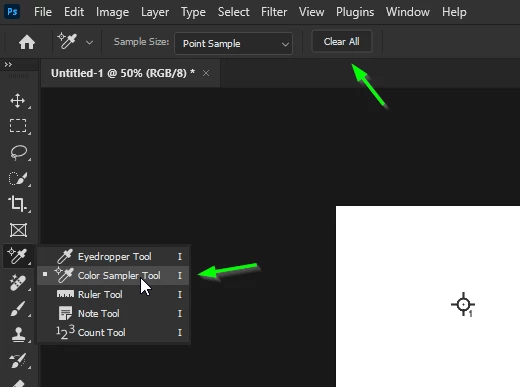
Perhaps it was pressed something incorrectly, the part that appears to be number 1 on the center point button of the moving tool will not disappear and will continue to be visible.
Press Ctrl+H to temporarily hide but reappear.
Can you get rid of it completely?

I'm in despair right now. Please share me how to fix it.


This topic has been closed for replies.
Correct answer Ged_Traynor

@helloP select the Color Sample Tool and then click on Clear All

1 reply

Ged_Traynor
Community Expert
Ged_TraynorCommunity ExpertCorrect answer
Community Expert
January 26, 2024

@helloP select the Color Sample Tool and then click on Clear All

helloPAuthor
Participant
January 26, 2024

Thank you so much!!!!! 

Thanks to your help, we are finally able to solve the problem! 😍

Ged_Traynor
Community Expert
Community Expert
January 26, 2024

You're welcome