Participating Frequently
November 10, 2021
Answered

Photoshop v23.0 problem merging spot channels

  • November 10, 2021
  • 6 replies
  • 3140 views

In the new release of Photoshop (v23.0)when merging spot color channels the color result is different than the previous version (v22.5.2). Considering I'm expexting to get the same result (working on an old document), it's a problem... I got back to Photoshop 2021

This topic has been closed for replies.
Correct answer CShubert

Hey everybody, wanted to share some insight into this issue that hopefully will answer your questions.


It is correct that you can see differences in the merged results between v22 and v23. However, the merged results in v22 (and earlier versions of Ps) were incorrect. The merged results now produced with Ps v23 (and later) are actually the right results, but unfortunately they are different.


The differences you are seeing are real, but not a bug. It is the result of fixing a previous bug with how spot channels were merged in CMYK based docs.


Sharing a file that shows this... notice how far off the colors are from the bottom-middle result. All of these images should be reasonably close to the same and only limited by their respective color spaces/profile gamuts.
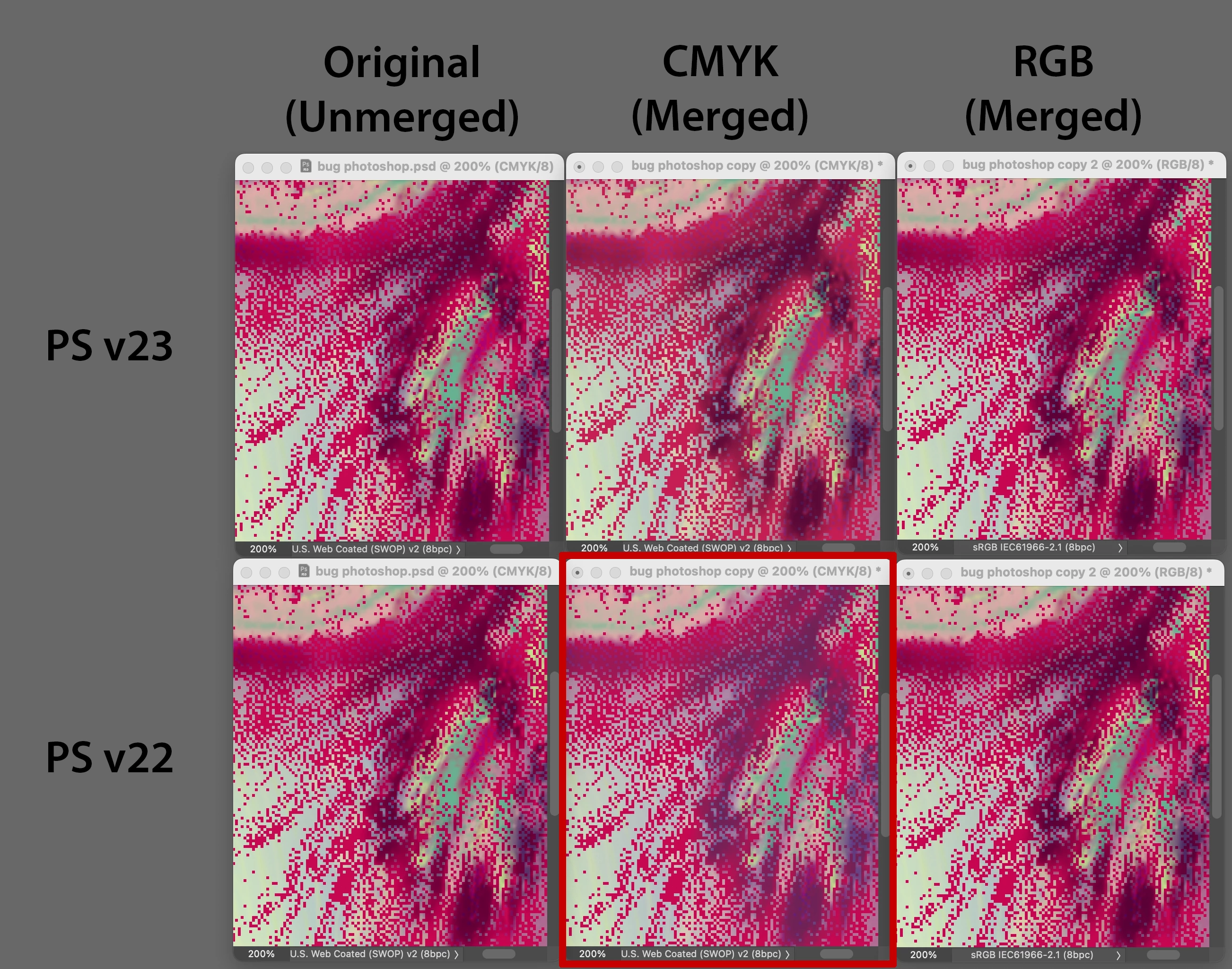


Thanks everyone, hope this helps.

6 replies

CShubert
Community Manager
CShubertCommunity ManagerCorrect answer
Community Manager
June 8, 2022

Hey everybody, wanted to share some insight into this issue that hopefully will answer your questions.


It is correct that you can see differences in the merged results between v22 and v23. However, the merged results in v22 (and earlier versions of Ps) were incorrect. The merged results now produced with Ps v23 (and later) are actually the right results, but unfortunately they are different.


The differences you are seeing are real, but not a bug. It is the result of fixing a previous bug with how spot channels were merged in CMYK based docs.


Sharing a file that shows this... notice how far off the colors are from the bottom-middle result. All of these images should be reasonably close to the same and only limited by their respective color spaces/profile gamuts.


Thanks everyone, hope this helps.

Participant
July 21, 2023

below is a screen shot of merging my spot channels into an rgb image the top image is spot channels the below image is merged to rgb

.

Stephen Marsh
Community Expert
Community Expert
June 8, 2022

Can moderator convert this discussion into a bug post?

Ged_Traynor
Community Expert
Community Expert
June 8, 2022
quote

Can moderator convert this discussion into a bug post?

By @Stephen Marsh

Moved to bug section

Participating Frequently
June 7, 2022
Participating Frequently
May 30, 2022

I'm wondering if anything is going on about this.  It's still a problem for us!  Does the file I sent is showing the problem clear enough?  Here is a new one for you.  Juste look at the name of the channels (it's the CMYK value of the spot color).  When merging in Photoshop 2023, it become something else with very different values...  in Photoshop 2022 it's keeping the original values.  Please tell me if you can see the problem and if anybody is workin on it.  We are expecting an issue soon

PECourtejoie
Community Expert
Community Expert
May 31, 2022

Pinging @J453 

Legend
November 11, 2021

I can't repro. I merged the channels in PS 2021 and 2021, then did a difference layer and the results are the same. (See attached files)

Legend
November 10, 2021

Could you post your source PSD with the two spot channels you're merging?

Participating Frequently
November 11, 2021

Here is the file.  I merge all the layers together.  The last one (with 0% solidity) is the problematic one.
