
Known Participant
October 6, 2018
Question

photoshop when zoom in starts to pixelate the images , but this problem never occurred previously

  • October 6, 2018
  • 7 replies
  • 4592 views

Hello

i am having a problem in adobe photoshop when asking to create a path the image starts to pixelate and this problem never happens before

i am using mac os 10.12 , and both adobe cc 2015 and 2018 are up to that but both have the same problem

can someone help

thanks
    This topic has been closed for replies.

    7 replies

    D Fosse
    Community Expert
    Community Expert
    October 8, 2018

    My, we're getting all kinds of replies here. It would help if people read the thread first.

    D Fosse
    Community Expert
    Community Expert
    October 7, 2018

    I've gone through a number of images looking for this, especially ones with slanting straight lines where it should be easy to spot. No sign of it. That includes some that were scaled, distorted and/or rotated, e.g. to straighten the horizon or correct perspective.

    In case it's camera-specific, these were taken with Nikon D810, D800, and Sony A7RII. All initially processed in Lightroom (various versions).

    So there is something in your workflow that does this, possibly and probably something non-standard. I don't use any third-party plugins.

    Known Participant
    October 8, 2018

    I have reset preferences and been working on new images .... so far they are good..but for example the previous image to the one i posted was good and the one that i post wasn't

    i am using a Phaseone  P45+ but also showed on my canon 1dx MK2 and nikon D850

    i am just waiting to see if the problem occurs again so i can post the steps prior to the effect shows

    Luis

    saponcpa
    Participating Frequently
    October 8, 2018

    What is the zooming distance? and which lens you using

    D Fosse
    Community Expert
    Community Expert
    October 7, 2018

    No idea, but maybe some plugin or filter is a likely candidate.

    If you can narrow it down (perhaps even to reproducible cases) it should be reported on the feedback site, which is more closely monitored by engineers.

    https://feedback.photoshop.com/photoshop_family

    Known Participant
    October 7, 2018

    thank you

    will do it and report there

    since this destroys the image

    D Fosse
    Community Expert
    Community Expert
    October 7, 2018

    Yes, anything that compromises image integrity is a serious issue. I'll keep a lookout here.

    D Fosse
    Community Expert
    Community Expert
    October 7, 2018

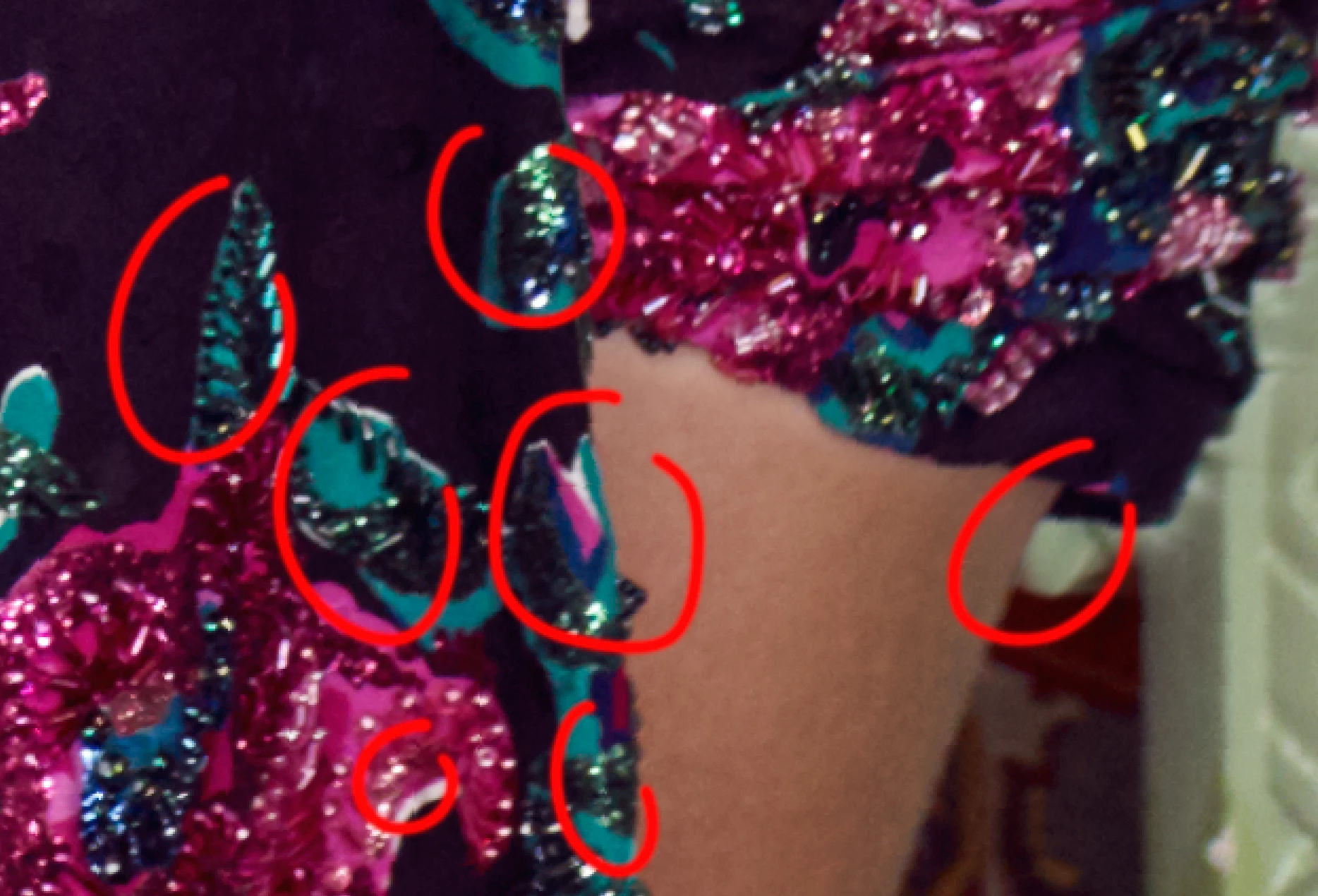
    Zooming further in reveals something interesting. It's not the edge - it's a regular block or tile offset that affects all the data. This looks more like file creation than file processing. What is the full file history?

    Known Participant
    October 7, 2018

    this is what the image should look like

    this is the same image ..just processed i use capture one as i always have this is the PSD file at 400% just processed and open in photoshop ..i cant recall the steps but they i am mainly preparing the images to send to retouchers so not much work been done like

    this is how the image looks now

    and this is how the image looks like when i open the first time on photoshop

    D Fosse
    Community Expert
    Community Expert
    October 7, 2018

    Yes, those screenshots show it very clearly. It's almost like horizontal slices, slightly offset.

    This doesn't look good. I've never seen it (and I pixel-peep very closely) - so the first thing I'd do is find out if it can be a video artifact. If this is really in the image data it's pretty alarming.

    lambiloon
    Community Expert
    Community Expert
    October 7, 2018

    ok then wait someone else will help more better who faced such issue...Good luck hope you got better solution.. we are all just here to solve as possible

    Ali Sajjad / Graphic Design Trainer / Freelancer / Adobe Certified Professional
    Known Participant
    October 7, 2018

    i understand ... but my point was more to dont blame the file since the problem is the software that is damaging the file ...that is quite frustrating

    lambiloon
    Community Expert
    Community Expert
    October 7, 2018

    Hi are you taking picture from Cell phone camera ? the things are seeing due to low value of light or overshoot as i think its night time , its not taken by professional camera...Thanks

    Ali Sajjad / Graphic Design Trainer / Freelancer / Adobe Certified Professional
    Known Participant
    October 7, 2018

    Sorry but this comment above is  a bit OFF LAMBILOON

    this is a medium format file, and properly expose with flash ,..this problem is new the image started to appear pixelated whatever the image even at 100%

    i need help to solve this serious problem

    when i open the file in photoshop for the first time the image is good , no pixelation ... but at some point it becomes pixelated without any scale or resizing done to the image also this is a 16 BiT file , i have open it on a second computer and once this image is save it opens on the other machine also pixelated

    LAMBILOON . comments like yours are truly  amateur and shouldn't even been given as a advice , READ THE POST BEFORE REPLAYING PLEASE

    lambiloon
    Community Expert
    Community Expert
    October 7, 2018

    Sorry little off comment then try to reset your Photoshop preferences may be something done in there otherwise someone else helps who faced this issue....Thanks.

    Ali Sajjad / Graphic Design Trainer / Freelancer / Adobe Certified Professional
    davescm
    Community Expert
    Community Expert
    October 6, 2018

    How far are you zoomed in?

    At 100% zoom 1 screen pixel is used to display 1 image pixel

    At 200% zoom 4 screen pixels are used to represent 1 image pixel - so the individual image pixels become visible

    At 300% zoom 9 screen pixels are used to represent 1 image pixel - so the image pixels are even more prominent

    ........etc

    Dave

    Known Participant
    October 6, 2018

    hello the image i sent was around 300% but see at 100% you can see the same problem there

    the line between the dress and skin should be straight and it isnt something is wrong even at 100%

    Known Participant
    October 6, 2018


    the file when open is normal this occurs once i start to work on the image and when i open on a different computer it shows the image with this problem