
Exit
  • Global community
    • Language:
      • Deutsch
      • English
      • Español
      • Français
      • Português
  • 日本語コミュニティ
  • 한국 커뮤니티
0

Photoshop: Why does my "Add Layer Mask" Button always look like it is selected?

New Here ,
Apr 03, 2020 Apr 03, 2020

Hello! I have been using Photoshop for a few years now, and all of the sudden, my "Add Layer Mask" Button is always selected. Anyone know how to fix this? I have already tried hitting Q on my keyboard, but that does not help. Thank you!
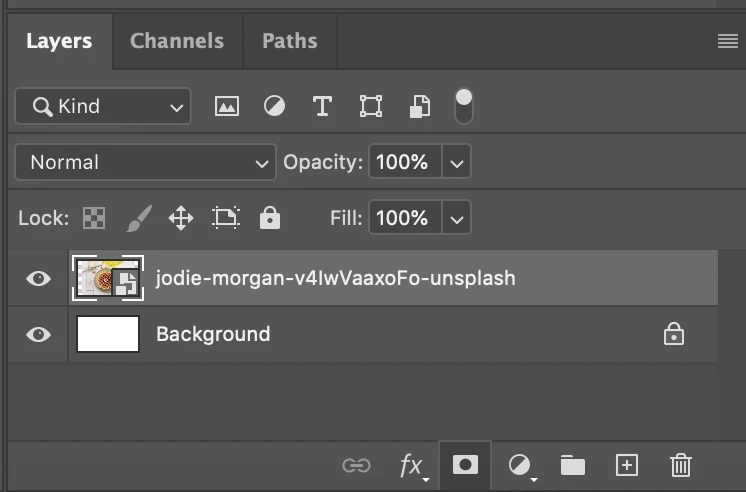
Screen Shot 2020-04-03 at 11.47.13 AM.png

1.1K
Translate
Report
Community guidelines
Be kind and respectful, give credit to the original source of content, and search for duplicates before posting. Learn more
community guidelines

correct answers 1 Correct answer

Community Expert , Apr 14, 2020 Apr 14, 2020

Hello, it is a bug that is fixed in the just released Ps 21.1.2, see:  https://helpx.adobe.com/photoshop/kb/fixed-issues.html#photoshop-desktop-fixed-issues

Translate
Adobe
Community Expert ,
Apr 14, 2020 Apr 14, 2020

Hello, it is a bug that is fixed in the just released Ps 21.1.2, see:  https://helpx.adobe.com/photoshop/kb/fixed-issues.html#photoshop-desktop-fixed-issues

Translate
Report
Community guidelines
Be kind and respectful, give credit to the original source of content, and search for duplicates before posting. Learn more
community guidelines
New Here ,
Apr 14, 2020 Apr 14, 2020

Thank you! It seemed to fix itself!

Translate
Report
Community guidelines
Be kind and respectful, give credit to the original source of content, and search for duplicates before posting. Learn more
community guidelines
New Here ,
Dec 12, 2022 Dec 12, 2022

 I have the same problem version 23.5.3 and I can't update anymore coz my mac is old

Translate
Report
Community guidelines
Be kind and respectful, give credit to the original source of content, and search for duplicates before posting. Learn more
community guidelines
Community Expert ,
Dec 12, 2022 Dec 12, 2022
LATEST

I can't upgrade on my old iMac either - just have to live with the old quirks. 

Melissa Piccone | Adobe Trainer | Online Courses Author | Fine Artist
Translate
Report
Community guidelines
Be kind and respectful, give credit to the original source of content, and search for duplicates before posting. Learn more
community guidelines