Baramjik Art
Participant
April 2, 2024
Question

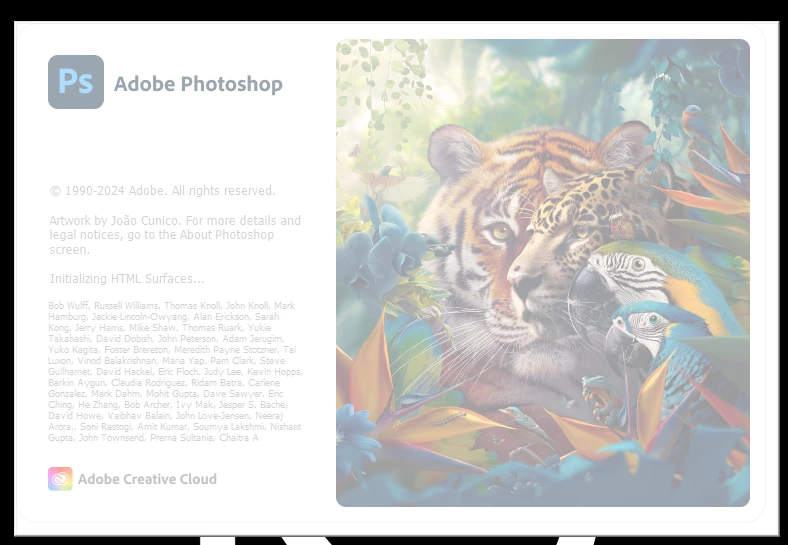
Photoshop won't open Stuck on initializing components

  • April 2, 2024
  • 8 replies
  • 1861 views

This topic has been closed for replies.

8 replies

Ged_Traynor
Community Expert
Community Expert
June 14, 2024

Try manually resetting your Photoshop preferences
https://helpx.adobe.com/ie/photoshop/using/preferences.html#Manually
Remember to back up your settings before doing the preference reset
https://helpx.adobe.com/ie/photoshop/using/preset-migration.html

Participant
June 14, 2024

I am having the same problem. I've tried uninstalling and re-installing. I thought this fixed it, but the problem is back again. UGH! I can't do any of my work. Very frustrating.

Participant
June 14, 2024

I got the same issue and really need a fix for it as it hinders me from doing my work.

Participant
May 28, 2024

I am having same issue, same "black box" around the initial startup window and seemingly stuck "Initializing Shared Components"


Participant
June 4, 2024

Was this issue resolved? I have some problem.

Baramjik Art
Participant
April 2, 2024

yes

kglad
Community Expert
Community Expert
April 2, 2024

in the future, to find the best place to post your message, use the list here, https://community.adobe.com/

p.s. i don't think the adobe website, and forums in particular, are easy to navigate, so don't spend a lot of time searching that forum list. do your best and we'll move the post (like this one has already been moved) if it helps you get responses.


<"moved from cc desktop bugs">
jane-e
Community Expert
Community Expert
April 2, 2024

@Baramjik Art 


I've moved your post from Creative Cloud Desktop to the Photoshop community where you are more likely to get help.


Did this just start? Is it a new installation?


Jane

Baramjik Art
Participant
April 2, 2024

Photoshop won't open Stuck on initializing components