

Pyro_Raider
Participant
February 12, 2020
Answered

Photoshop won't update

  • February 12, 2020
  • 5 replies
  • 27647 views

I have not been able to update photoshop for quite a while.  The Creative Cloud desktop app tells me it needs to update, so I have tried several times to update the program with no success.  I receive no errors.  The download simply stops at a different percent every time.  Sometimes it's stuck at 4% for over 12 hours before I cancel the process.  Sometimes it gets stuck at 2%, 10%, 27%, and 67%.  67% is the most progress I've got so far.  Each time I made sure my PC wasn't running any other unneeded programs or processes at the same time, but to no avail.  I read about suggestions to manually update Photoshop without using Creative Cloud but I do not know how to do that or where to find the recent updates to download.  What should I do about this?
Correct answer Pyro_Raider

OK, then I don't know. I got a CC app update yesterday (but I don't have auto updates on, so I get a notification).


In any case, Photoshop version 21.1 is the latest. If you have that, there's nothing to update.


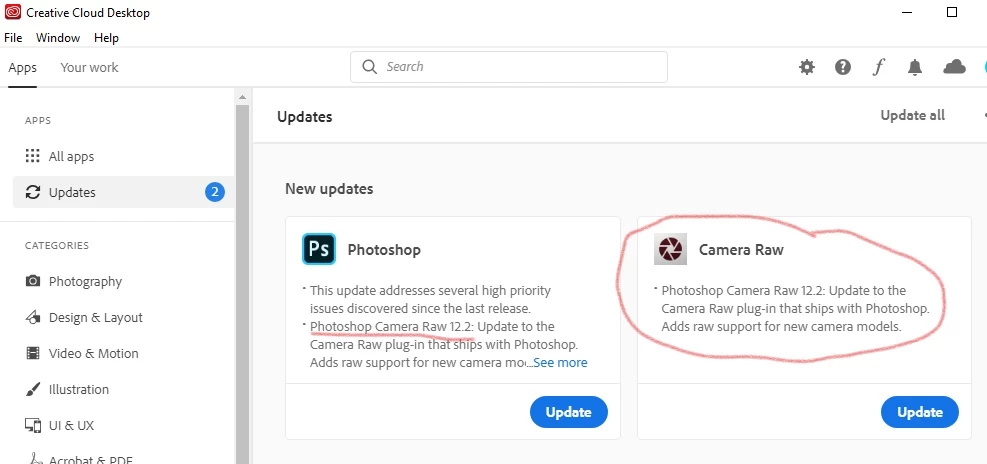
I found the issue.  Oddly enough, I had to update Camera Raw first by itself.  Then Photoshop updated without any issue.  I didn't think I needed one for the other, but suppose I do.  Thanks for the effort and pointers of those who took the time to reply.

5 replies

Participant
May 17, 2025

Updating Bridge first was the key for me also, as noted by another poster. How poorly designed on Adobe's part - it means there is a dependency on the Bridge update that prevents the Photoshop update lol. 2024 M4 MaX MacBook Pro and had this issue as of 5/17/25 - go figure. Update bridge first and it will immediately resolve the hang up. 

Participant
January 14, 2022

Same was happening to me with InDesign. Resolved: Update while deleting preferences: When launching Photoshop, Option-Command (Mac) / Alt-Control (Win) + Shift prompts you to delete the Adobe Photoshop settings file (which stores your preferences). Both updated just fine. I reset my preferences and continued to work.

Participant
February 5, 2022

Seemed to work for PS 2022 as well.  Thanks for sharing.

Participating Frequently
January 6, 2021

So what do we do ?   Is P.S. listening ?   Who can we contact ?   Is there a chat line or such that can be accessed ?   I really do appreciate all the good advise here, however, it seems to me that someone at Adobe or P.S.  would contact at least one of us with some advise or help.   Hello........anyone home? 

Peru Bob
Community Expert
Community Expert
January 6, 2021
Participant
July 21, 2020

I have the same issues.  PS won't update, nor will Camera Raw.  I can't upload either separately.  I've closed all other apps, tried this numerous times.  It just sits there saying "waiting".  Then does nothing.  I have PS v 21.2 and CR v. 12.3.  CC says updates are available.  I've never had trouble with this.  LR updated ok.  Any help out there?  Thanks

Participating Frequently
January 5, 2021

I'm experiencing the exact same scenario.  Haven't been able to do an update for months now even though CC says that I need them.  When I select "update",  it just sits on "waiting" for up to an hour.  Then I give up.  I did see where the person said that they updated Raw Camera first, then everything else fell in line, but that does not work for me.  I'm completely lost on this one.  I hope that not updating for this extended period causes no harm........

Greg

Peru Bob
Community Expert
Community Expert
February 12, 2020

I had a similar issue.

Make sure that you have all Windows updates that are available.

The one thing that was causing it for me, believe it or not, was that I needed to do a clean installation of the latest Studio graphics driver from the NVIDIA website. After doing that and restarting, all was OK.

Pyro_Raider
Participant
February 22, 2020

I have now fully updated my pc and NVIDIA graphics driver, but Photoshop still will not update properly.  I tried to update it again today and below you can see the result where the process eventually froze at 61% and has remained there for over an hour.  I do not know what else to try.

I will note that my pc went into sleep mode while I was away.  Would that cause the update to freeze like this?

D Fosse
Community Expert
Community Expert
February 22, 2020

Update your Creative Cloud desktop application. After you've done that, those other updates go away. There is no Photoshop update since 21.1.


I got this too. There is a glitch here somewhere.