
Exit
  • Global community
    • Language:
      • Deutsch
      • English
      • Español
      • Français
      • Português
  • 日本語コミュニティ
  • 한국 커뮤니티
0

Photshop color change, car parts do not look realistic.

New Here ,
Jan 13, 2025 Jan 13, 2025

Hi i have learnt how to change colour in photshop, im changing car parts like bumpers. Main issue is the bumper i have made looks really poor like painted with brush, it doesnt not remind real bumper paint here is photo
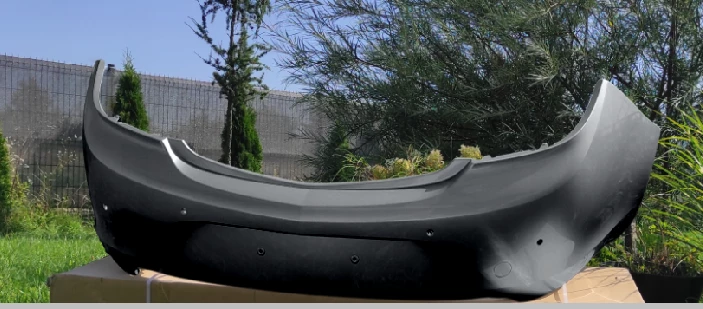
wikul_4446_0-1736797053765.png


here is what i except it to look like
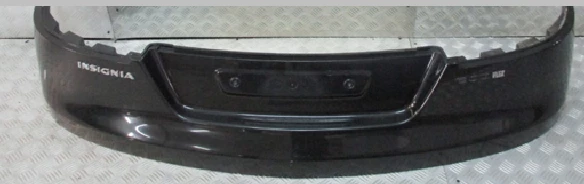
wikul_4446_1-1736797080481.png

i wanna also mention im not able to get result i want with curves because then bumper becomes too dark.


im attachting my file in cause someone wants to try their strenght.


i didnt think that changing colour would be so hard to make it look good. i have also noticed that its easier to change car stuff from mid gray colour than silver bright im currently changing 

wikul_4446_2-1736797260448.png


TOPICS
Windows
853
Translate
Report
Community guidelines
Be kind and respectful, give credit to the original source of content, and search for duplicates before posting. Learn more
community guidelines
Adobe
Community Expert ,
Jan 13, 2025 Jan 13, 2025

I think you are getting the hang of what is going on from your last statement.  Basically, what ever method you use to color an object works best on mid grey tones, and has no effect on full black, and full white.  

image.png

Translate
Report
Community guidelines
Be kind and respectful, give credit to the original source of content, and search for duplicates before posting. Learn more
community guidelines
Community Expert ,
Jan 14, 2025 Jan 14, 2025
quote

i have also noticed that its easier to change car stuff from mid gray colour than silver bright im currently changing
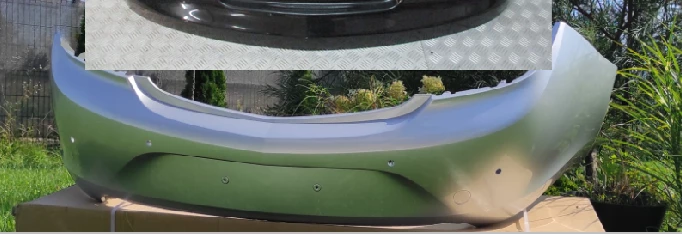
By @wikul_4446


Mid gray is an much easier starting point because it’s low contrast, so you can increase it if needed. 


Silver bright is difficult because it’s high contrast with possible large areas of high reflection (specular highlights), which often appear as solid white. Because white has no gray tones, it doesn’t change. For a silver starting image, you may need to lower contrast, and make sure the white point is lowered so that there’s something for color to grab on to, but it still might not look as convincing as a middle gray starting image.


Another factor is that some colors are lighter or darker than others, at the same saturation value. Fully saturated yellow is lighter than fully saturated red. So, for a great color change, you have to pay attention to and modify tone and contrast as well as color. Many color change techniques involve one adjustment layer for the tone and another for the color.


Translate
Report
Community guidelines
Be kind and respectful, give credit to the original source of content, and search for duplicates before posting. Learn more
community guidelines
New Here ,
Jan 14, 2025 Jan 14, 2025

here is what it looks like after lowering contrast, better but  not perfect. i think if background is removed then it wont be so noticeable that this colour has been modyfited

wikul_4446_0-1736880842849.png


btw any tips when changing colour from dark? do i lower contrast too? result images are always intensive

wikul_4446_1-1736880995554.png


Translate
Report
Community guidelines
Be kind and respectful, give credit to the original source of content, and search for duplicates before posting. Learn more
community guidelines
New Here ,
Jan 14, 2025 Jan 14, 2025

wikul_4446_0-1736881430670.png

i lowered brightness a bit, i couldnot more because then bumper was too dark

Translate
Report
Community guidelines
Be kind and respectful, give credit to the original source of content, and search for duplicates before posting. Learn more
community guidelines
Community Expert ,
Jan 14, 2025 Jan 14, 2025
LATEST

If you haven’t watched the video below already, the last couple of minutes include techniques for starting from a dark original.


Starting from mid to lighter gray is easier than starting from dark because digital images store more information for the lighter tones. Because images store less digital information for the shadows, lightening shadows can reveal noise and banding. 


Translate
Report
Community guidelines
Be kind and respectful, give credit to the original source of content, and search for duplicates before posting. Learn more
community guidelines