Participant
September 2, 2021
Answered

PHOTSHOP: HEX CODE KEPT ON CHANGING

  • September 2, 2021
  • 3 replies
  • 2763 views

The client gave me the exact hex code that he wanted me to use,  but when I type the exact code the moment I enter or click Okay, the code swaps to a different code. 


I also tried typing manually the notations of the exact code. but still changes into a different code. I'm only months in the industry thank you so much for the answers! 

Correct answer D Fosse
quote

the exact hex code


By @markpambuena


 Actually there is no such thing. It's only exact insofar as it refers to a specific color space. Usually, by general consensus, that's sRGB IEC61966-2.1, but no guarantees. For people unfamiliar with color management and who work without color management, it will usually be in monitor color space. In other words, all over the map. So you need to get this established.


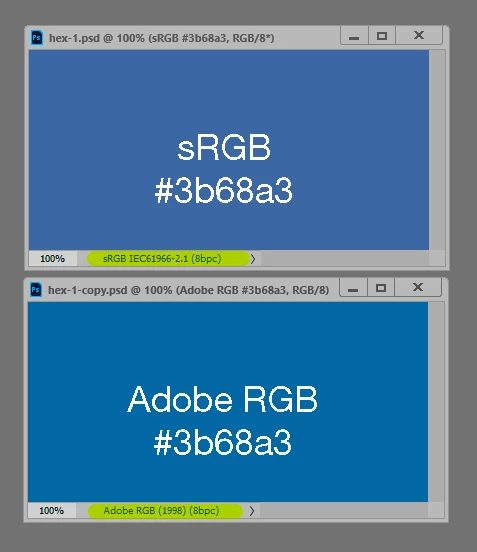
Here's a completely random example. I could probably find others where the difference is even more striking:


In short: Get confirmation that the hex code actually refers to sRGB. Then put those numbers into an sRGB document.

3 replies

D Fosse
Community Expert
D FosseCommunity ExpertCorrect answer
Community Expert
September 2, 2021
quote

the exact hex code


By @markpambuena


 Actually there is no such thing. It's only exact insofar as it refers to a specific color space. Usually, by general consensus, that's sRGB IEC61966-2.1, but no guarantees. For people unfamiliar with color management and who work without color management, it will usually be in monitor color space. In other words, all over the map. So you need to get this established.


Here's a completely random example. I could probably find others where the difference is even more striking:


In short: Get confirmation that the hex code actually refers to sRGB. Then put those numbers into an sRGB document.

Participant
September 2, 2021

This really helps a lot for a begginer like me thank you so much! 

c.pfaffenbichler
Community Expert
Community Expert
September 2, 2021

As @D Fosse explained the intended color appearance of hex- or RGB-values can only be determined if the Color Space is known. 

Otherwise it would be similar to a map without a scale.

One may be able to say that place x is nearer to place y than to place z but not what the actual disctance is. 

Without the Color Space-definition one may say that a pixel is darker, bluer, … than another pixel in the same image but not what it is supposed to look loke exactly. 


When you work with a CMYK image the issue gets worse – many CMYK Spaces are smaller than many RGB Spaces. (Even though there may be regions in a CMYK Space that some RGB Spaces do not cover.) 

So it is possible that the color is out-of gamut for the CMYK Space and therefore has to be changed immediately to even be aprocimated in the CMYK image. 

Legend
September 2, 2021

Hex colors are notoriously unreliable, although there is a standard web palette meant for sRGB documents to display in a web browser. Make sure your document colorspace is sRGB and only web colors.

Participant
September 2, 2021

This really helps a lot for a beginner like me thank you so much! 

PECourtejoie
Community Expert
Community Expert
September 2, 2021

Hello, are you in a RGB document? 

Is "Only web colors" checked in the color picker?

Participant
September 2, 2021

It is in CMYK, what does only web colors gives to a document? 

PECourtejoie
Community Expert
Community Expert
September 3, 2021

Hello, I would go as far to ask you why are you working in CYMK? Which CYMK profile did you chose, and why?

How would the image be printed? Will it be integrated in a Desktop Publishing app, like InDesign?


If you print on an inkjet, use RGB. If it goes to InDesign, stay in RGB, and preview (CTRL+Y) a new window for your document with the correct color profile the printer will use, the conversion to the correct CYMK profile can be done in InDesign. This will also allow a PDF/Ebook version to stay in RGB.

If you silkscreen, shouldn't you use a spot color for the color you are trying to match?