
Participant
March 27, 2023
Answered

Pinselfarbe wechseln mit der Option-Taste

  • March 27, 2023
  • 3 replies
  • 619 views

Beim retuschieren mit dem Pinselwerkzeug war es immer möglich mit der alt-Taste zur Pipette zu wechseln und eine neue Vordergrundfarbe aufzunehmen, jetzt nimmt PS die Farbe als Hintergrundfarbe auf, das stört den Workflow erheblich, man muss ständig Vorder-Hintergrundfarbe umstellen – wird das nochmal behoben, oder kann ich was tun?
This topic has been closed for replies.
Correct answer Kevin Stohlmeyer

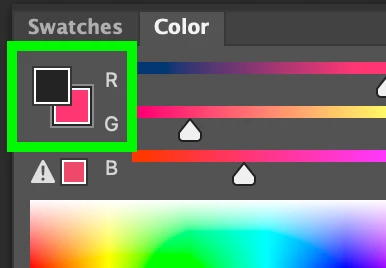
Hi @Ulla Keßler check your Color Panel - you have the background swatch clicked. Click the foreground swatch in the Color Panel to switch back.


3 replies

melissapiccone
Community Expert
Community Expert
March 27, 2023

A quick easy way to switch is simply hit the x key. But yeah - what Kevin said is probably what is happening. 

Melissa Piccone | Adobe Trainer | Online Courses Author | Fine Artist
Kevin Stohlmeyer
Community Expert
Community Expert
March 27, 2023

@melissapiccone x key flips the color, but the Color panel is the only place you can designate what alt/opt click will apply the color to - foreground or background.

CShubert
Community Manager
Community Manager
March 27, 2023

Hi @Ulla Keßler curious if you mean Option key as you list you are on a Mac and testing here by pressing the Option key the eyedropper comes up to select a color.


Kevin Stohlmeyer
Community Expert
Kevin StohlmeyerCommunity ExpertCorrect answer
Community Expert
March 27, 2023

Hi @Ulla Keßler check your Color Panel - you have the background swatch clicked. Click the foreground swatch in the Color Panel to switch back.


Participant
March 27, 2023

Vielen, vielen Dank  – das wahr die Lösung!!!  : )