lyriks_2955402
Participating Frequently
June 13, 2019
Answered

Pixelart get's blurred when i export!

  • June 13, 2019
  • 6 replies
  • 53748 views

Hi guys, I'm working on a new pixel art drawing in Photoshop but all my images are blurred when I export them.
I export them with the "nearest neighbor" option and as png file. if i open it with photoshop it will be back to normal,
but if i open it with another program it will be completely blurry. I hope somebody can help me. 

Kind regards

Max

This topic has been closed for replies.
Correct answer Semaphoric

Here is the view in Photoshop with 100% Zoom

Here is the view in Photoshop with Full Image Size

Here is the view in Windows Photoviewer (It's Zoomed because if it's not you can't see that it's blurred)
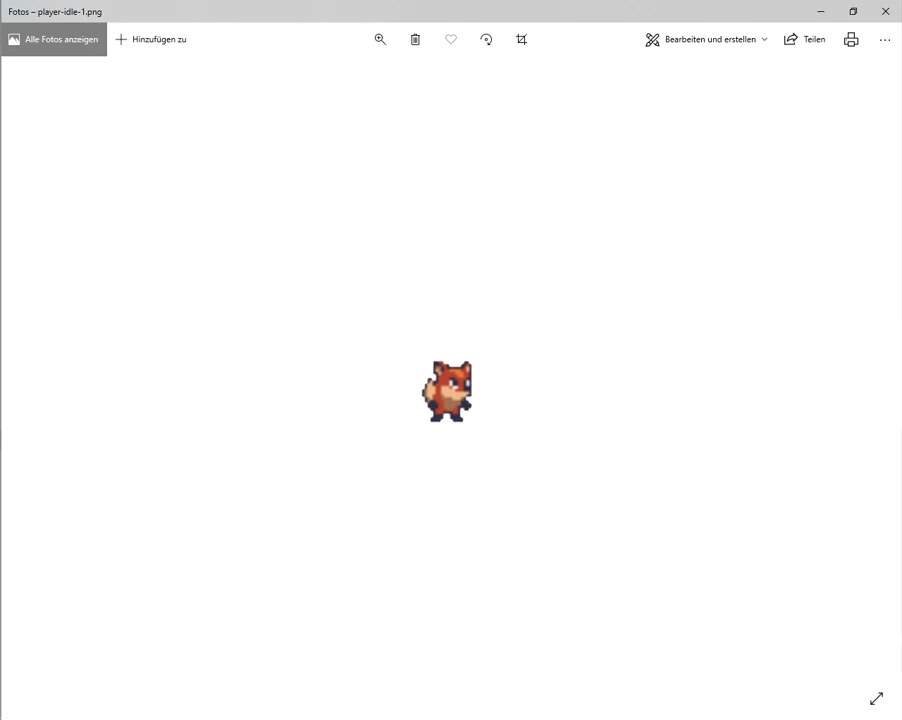
Here is the View in Unity

And Finaly this is the Original Image Saved in Photoshop as PNG

I hope the pictures have made the situation clearer and I hope that you can help me better

Kind regards

Max


The blurriness is produced by the other programs scaling up  a tiny image. The view in Photoshop at 100% is the only accurate view. Your "full image size" view is about 2600%. If you want your image to lok like that in other programs, use Image > Image Size (Alt+Ctrl+I), with Width and Height linked and set to 2600%, and Resample checked and set to "Nearerst Neighbor":
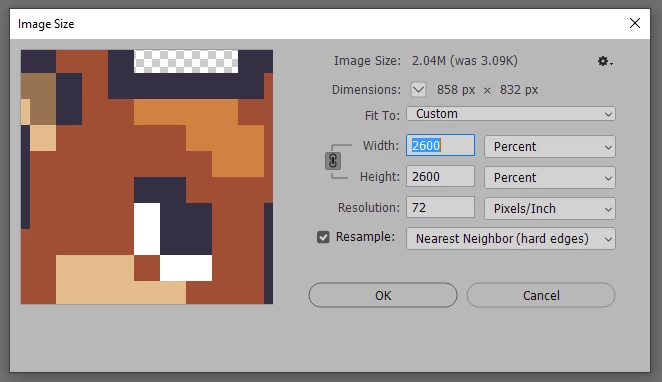
    

Then save a new copy (so you still have your original, if needed).

6 replies

rayek.elfin
Legend
June 16, 2019

lyriks.2955402​ I have a feeling you are a beginner game developer. There's a couple more things to be aware of when dealing with pixel art, screen aspect ratios, and so forth.

This is a good overview, and although it is aimed at GameMaker, the theory still holds true.

Scaling, Resolution, and Aspect Ratio Management for GMS1 & GMS2 | GameMaker Community

rayek.elfin
Legend
June 16, 2019

I am sorry Semaphoric: the answers here are just plain wrong in a game asset workflow setting. Most game engines import low resolution pixel art and apply a filter to upscaled images. The trick is to turn this behaviour off, and activate the pixel art compatible settings in a game engine.

Never NEVER EVER upscale your pixel art to huge resolutions to attempt to fix the blurry result. That will gobble up video memory like no tomorrow and destroy game performance. Instead, look up Unity's pixel art settings, and apply those to keep your pixel art sharp looking.

For example:

Achieve Crisp Pixel Art with Unity 2018.2! - Pixel Perfect - YouTube

Semaphoric
Community Expert
Community Expert
June 16, 2019

Yes, as I said, I'm no expert regarding pixel art. It took me a while too see what the OP was after.Once I did, in my third post, I stated to work zoomed in on a tiny image. I should have added to export at 100% as well.

lyriks_2955402
Participating Frequently
June 15, 2019

It also happens wehen i tried to open an pixel art image in photoshop and then saving it it get‘s also blurry.

Legend
June 13, 2019

If it is still fine in Photoshop, then the other app is at fault.

Please tell us the other app, and show screen shots of Photoshop and the other app, so we may suggest causes and perhaps solutions. PLEASE DO NOT TRY TO EMAIL SCREEN SHOTS.

lyriks_2955402
Participating Frequently
June 15, 2019

The problem is that in any other programm it looks blurry so I think this problem causes of photoshop.

lyriks_2955402
Participating Frequently
June 15, 2019

The blurriness is produced by the other programs scaling up  a tiny image. The view in Photoshop at 100% is the only accurate view. Your "full image size" view is about 2600%. If you want your image to lok like that in other programs, use Image > Image Size (Alt+Ctrl+I), with Width and Height linked and set to 2600%, and Resample checked and set to "Nearerst Neighbor":


Then save a new copy (so you still have your original, if needed).


Also another problem is that now my Image is to big because i need it tiny and i that image i sent in this discussion is from a free preset and i have a version that is the original and another one that was opend and saved in Photoshop (without any change) and that version is blurred. The Original is also tiny but not blurred.

How is that possible because i need this size for my image and other youtuber who made tutorials about pixel art are not facing this problem. How do they export this so tiny and perfect.

please Help

Kind regards

Max

Here is the Original Image that is tiny and not blurred

Community Expert
June 13, 2019

Can you post an example of an image - both what it should look like and the blurry version (can take a screenshot when open in another application).

Nancy OShea
Community Expert
Community Expert
June 13, 2019

What is the height and width of your final image in pixels?

Nancy O'Shea— Product User & Community Expert
lyriks_2955402
Participating Frequently
June 15, 2019

30 by 30 pixels