Participant
January 9, 2023
Answered

Pixelated images after cropping

  • January 9, 2023
  • 3 replies
  • 1138 views

When I try to click on newly cropped image on PS 2023,it shows a tiny image then Fit on screen ,image is pixelated



This topic has been closed for replies.
Correct answer Kevin Stohlmeyer

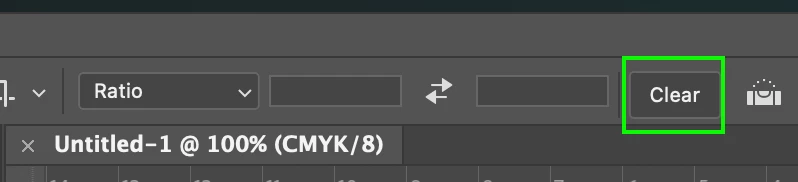
Check your crop settings in the options bar at the top - you could be reducing resolution. Always good to clear settings if unsure.
 

3 replies

Nancy OShea
Community Expert
Community Expert
January 9, 2023

Go to Image > Image Size.

What is the height/width and resolution of your cropped image?


Nancy O'Shea— Product User & Community Expert
Jumpenjax
Community Expert
Community Expert
January 10, 2023

I agree with Nancy. If the quality of the picture is low resolution then it would cause this problem.

Lee- Graphic Designer, Print Specialist, Photographer
Kevin Stohlmeyer
Community Expert
Kevin StohlmeyerCommunity ExpertCorrect answer
Community Expert
January 9, 2023

Check your crop settings in the options bar at the top - you could be reducing resolution. Always good to clear settings if unsure.


Participant
January 9, 2023

Thanx,thanx,thanx! kevin stohlmeyer. You solved a 

major problem for me!


Kevin Stohlmeyer
Community Expert
Community Expert
January 9, 2023

@Ron27766510pvlj anytime - make sure to mark the answer as correct!

kglad
Community Expert
Community Expert
January 9, 2023

<moved from cc services >