Kostiantyn D
Participating Frequently
June 17, 2023
Answered

Pixelated strokes

  • June 17, 2023
  • 3 replies
  • 924 views

Hi, I have a weird issue where my strokes in Photoshop become pixelated. It happens after a few minutes of drawing, and it's gone after I switch to another app and come back to Photoshop. But it happens again after a few minutes.


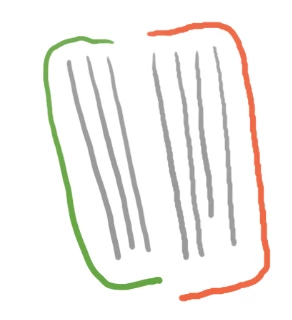
In the picture below, the left side shows normal lines, while the right side shows pixelated ones.


I use the default hard brush with smoothing turned off, and I don't change brush settings, so the lines on both sides were drawn with the same settings.
Photoshop version: 24.5.0

Tablet: Wacom Cintiq Pro 24 Touch

Wacom driver version: 6.4.2-3

Nvidia driver version: 535.98 (RTX 3070)

Windows version: 11 Home 22H2


I tried disabling Windows Ink and placing 'UseSystemStylus 0' into 'PSUserConfig.txt,' but it didn't help. I also tried changing some settings in the Performance tab in Photoshop but it didn't help either.


Has anyone else experienced the same issue?
This topic has been closed for replies.
Correct answer Trevor.Dennis

I should have mentioned that, but didn't catch that you were using a Cintiq.  Windows Ink has been the preferred API for tablets for several versions. 


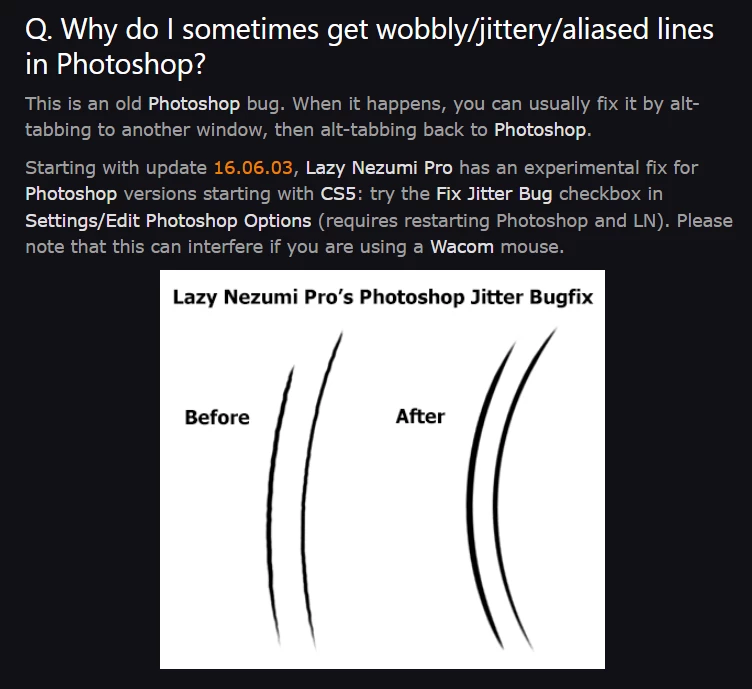
I see you are using Windows.  Do you use Lazy Nezumi Pro?  It is the single most useful third party Photoshop addon bar none IMO, and fixes several tablety issues like shoelace line endings.  It was doing amazing brush smoothing years and years before Photoshop added, and it still does a better job with lots of options.  I especially like being able to map line width to pressure rather than Photoshop's linear progression.


This is from the LNP Info page


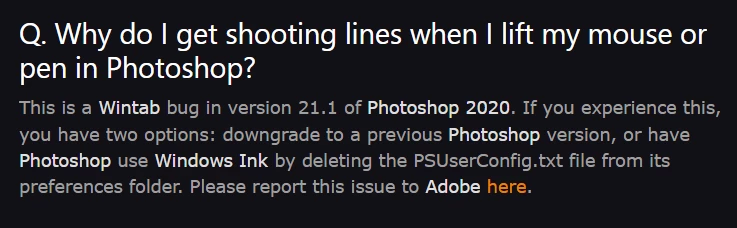
As is this one which appears to relate directly to your issue


My most used preset is Vanishing Lines which allows you to match perspective to original scenes, but it has dozens of presets so do check it out.

3 replies

Trevor.Dennis
Community Expert
Community Expert
June 19, 2023

The only thing I can think of is that you are using an erodible preset.  The easiest fix is to reset the brush tool.


If you still have the problem, and are viewing at 100% 1:1 zoom ratio, show us a full screen full res screen shot as c.p. suggested.

Kostiantyn D
Participating Frequently
June 19, 2023

Thanks for the hint! Will try it out when I'm at home.

c.pfaffenbichler
Community Expert
Community Expert
June 18, 2023

What are you talking about exactly? 

I fail to notice a relevant difference in the quality of the strokes. 

Edit: I think I get what you meant now … not the edges themselves, but the »stairs« on a larger scale.  

Could you please post screenshots taken at View > 100% with the pertinent Panels (Toolbar, Layers, Brush Settings, Options Bar, …) visible the next time it happens? 

Kostiantyn D
Participating Frequently
June 19, 2023

Here is a screenshot with all the settings visible. On the left side are lines with the "stairs" effect when the issues happens. On the right side are normal lines (after doing Alt+Tab).


Yesterday I removed 'UseSystemStylus 0' from 'PSUserConfig.txt' and re-enabled Windows Ink and it seems it fixed the issue. I think I will leave it like this.


Using Windows Ink introduces another issue though. Slider, like the one that changes brush size, become less responsive. But I can live with it for now.


Trevor.Dennis
Community Expert
Trevor.DennisCommunity ExpertCorrect answer
Community Expert
June 20, 2023

I should have mentioned that, but didn't catch that you were using a Cintiq.  Windows Ink has been the preferred API for tablets for several versions. 


I see you are using Windows.  Do you use Lazy Nezumi Pro?  It is the single most useful third party Photoshop addon bar none IMO, and fixes several tablety issues like shoelace line endings.  It was doing amazing brush smoothing years and years before Photoshop added, and it still does a better job with lots of options.  I especially like being able to map line width to pressure rather than Photoshop's linear progression.


This is from the LNP Info page


As is this one which appears to relate directly to your issue


My most used preset is Vanishing Lines which allows you to match perspective to original scenes, but it has dozens of presets so do check it out.

Leslie Moak Murray
Community Expert
Community Expert
June 17, 2023

Make sure that when you stroke, "Brush" is selected and not "pencil."

Kostiantyn D
Participating Frequently
June 17, 2023

Thanks for your reply Leslie. I double checked, it was the Brush tool.