
Participant
May 28, 2021
Question

Pixels appearing over drawing

  • May 28, 2021
  • 1 reply
  • 1555 views

I use photoshop to make digital art, something keeps happening where these multicoloured pixels appear over my sketches and I have no idea why, what it means or how to stop it from happening. They disappear if I brush over them but I'd like to stop it from happening in the first place. I have only used the brush tool on this layer and there are two other layers, the background layer (unaltered) and a layer with some colour fill around the drawing (not where the pixels appear. 

Has anyone else experienced this? I've asked around but nobody seems to have even encountered this issue let alone know why it's happening or how to fix it. Thanks.
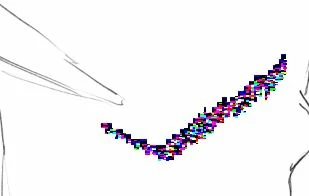
This topic has been closed for replies.

1 reply

nikunj.m
Legend
May 29, 2021

Hi,


We're sorry about the trouble with Photoshop. This is certainly very strange behavior. Would you mind telling us which version of Photoshop are you using along with your computers operating system?


If you zoom in & zoom out on the document or if you hide & then unhide the layer on which you are drawing, do the colors disappear? If yes, then please try disabling the option to Use Graphics Processor from Photoshop by going to Preferences, then Performance. Once done, quit & relaunch Photoshop to check if that helps.


You can also try to reset the preferences of Photoshop using the steps mentioned here: https://adobe.ly/2Qzc0K3

Please backup your settings prior to resetting the preferences. You can check: https://adobe.ly/2vNz6FG


Let us know how it goes!

Regards,

Nikunj

_amelia_dAuthor
Participant
June 5, 2021

My laptop is Windows 10

Adobe Photoshop Version: 22.4.1 20210518.r.211 7b18b4f x64


The colours don't disappear when zooming in and out. I'm not sure about hiding, unhiding the layer & it only happens sometimes so I can't check unless it happens again!


Thanks!


Mike_Gondek10189183
Community Expert
Community Expert
June 5, 2021

Graphics Processor

Uncheck these 2 settings


Click Advanced