
bluecd
Inspiring
March 22, 2018
Answered

Place x-guides at custom origin OR two crossed guides at once...

  • March 22, 2018
  • 2 replies
  • 1290 views

Hello,

Did anybody succeeded with a script that would enable placing two guides at custom set origin/origin for rulers/

or just two crossed guides at once?

Above seems best solution for multiple circle/ellipse selection by stretching from a corner point/origin.
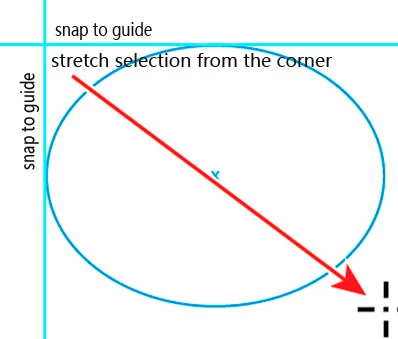
cheers,
This topic has been closed for replies.
Correct answer pixxxelschubser

Hi bluecd​,

sorry, your description is not clear for me.

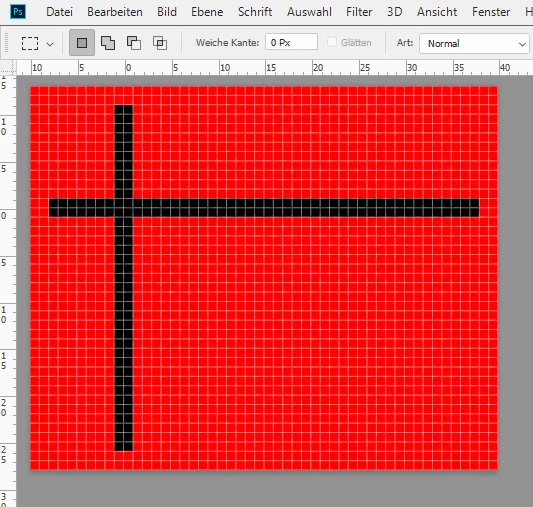
If I understand you right, your ruler origin is different to the document origin (eg as in the picture below)

In this case - run the script snippet for creating two crossed guides at ruler origin [0,0]

activeDocument.guides.add (Direction.VERTICAL, 0);

activeDocument.guides.add (Direction.HORIZONTAL, 0);

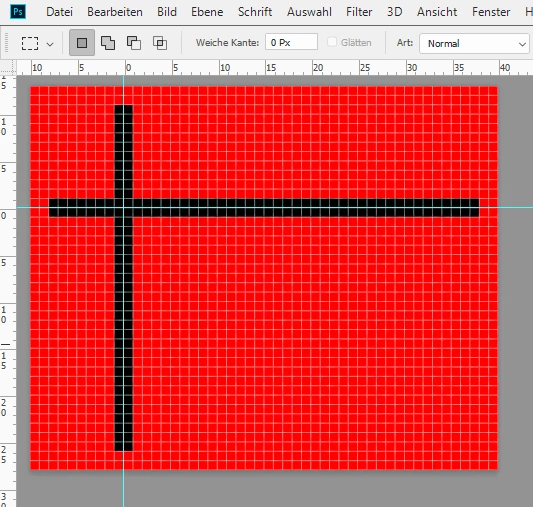
You will get the following result:

Is that what you want?

If so, have fun

If not, please explain in detail (my english is not the best)

2 replies

bluecd
bluecdAuthor
Inspiring
March 25, 2018

a hard one-just for testing but generally they are better quality&contrast

pixxxelschubser
Community Expert
pixxxelschubserCommunity ExpertCorrect answer
Community Expert
March 22, 2018

Hi bluecd​,

sorry, your description is not clear for me.

If I understand you right, your ruler origin is different to the document origin (eg as in the picture below)

In this case - run the script snippet for creating two crossed guides at ruler origin [0,0]

activeDocument.guides.add (Direction.VERTICAL, 0);

activeDocument.guides.add (Direction.HORIZONTAL, 0);

You will get the following result:

Is that what you want?

If so, have fun

If not, please explain in detail (my english is not the best)

bluecd
bluecdAuthor
Inspiring
March 23, 2018

Thanks A LOT !!, This is great, feel ashamed its so easy and I am starting to get into Adobe JS.

I added:

#target Photoshop

wi/out that it does not want to work.;

I just would like to add optionally the code starting stretching a circle/ellipse with snapping to these guides turned on...

pixxxelschubser
Community Expert
Community Expert
March 23, 2018

Please, describe your workflow exactly.

Why is the ruler origin different from document origin?

And I think you mean an ellipse as shape, right?

Normally I do not wotk with a different ruler origin. That makes a lot of problems. Here is a sample code for creating an ellipse as shape from document origin:

createCircle_shape (0, 0, 255, 0, 0, 20, 30)  // a small ellipse with height of 20px and width of 30px

function cTID(s) { return app.charIDToTypeID(s); };

function sTID(s) { return app.stringIDToTypeID(s); };

function createCircle_shape (_red, _green, _blue, _top, _left, _bottom, _right) {

    var desc14 = new ActionDescriptor();

        var ref6 = new ActionReference();

        ref6.putClass( sTID('contentLayer') );

    desc14.putReference( cTID('null'), ref6 );

        var desc15 = new ActionDescriptor();

            var desc16 = new ActionDescriptor();

                var desc17 = new ActionDescriptor();

                desc17.putDouble( cTID('Rd  '), _red );

                desc17.putDouble( cTID('Grn '), _green );

                desc17.putDouble( cTID('Bl  '), _blue );

            desc16.putObject( cTID('Clr '), cTID('RGBC'), desc17 );

        desc15.putObject( cTID('Type'), sTID('solidColorLayer'), desc16 );

            var desc18 = new ActionDescriptor();

            desc18.putInteger( sTID('unitValueQuadVersion'), 1 );

            desc18.putUnitDouble( cTID('Top '), cTID('#Pxl'), _top );

            desc18.putUnitDouble( cTID('Left'), cTID('#Pxl'), _left );

            desc18.putUnitDouble( cTID('Btom'), cTID('#Pxl'), _bottom );

            desc18.putUnitDouble( cTID('Rght'), cTID('#Pxl'), _right );

        desc15.putObject( cTID('Shp '), cTID('Elps'), desc18 );

            var desc19 = new ActionDescriptor();

            desc19.putInteger( sTID('strokeStyleVersion'), 2 );

            desc19.putBoolean( sTID('strokeEnabled'), false );

            desc19.putBoolean( sTID('fillEnabled'), true );

            desc19.putUnitDouble( sTID('strokeStyleLineWidth'), cTID('#Pxl'), 1.000000 );

            desc19.putUnitDouble( sTID('strokeStyleLineDashOffset'), cTID('#Pnt'), 0.000000 );

            desc19.putDouble( sTID('strokeStyleMiterLimit'), 100.000000 );

            desc19.putEnumerated( sTID('strokeStyleLineCapType'), sTID('strokeStyleLineCapType'), sTID('strokeStyleButtCap') );

            desc19.putEnumerated( sTID('strokeStyleLineJoinType'), sTID('strokeStyleLineJoinType'), sTID('strokeStyleMiterJoin') );

            desc19.putEnumerated( sTID('strokeStyleLineAlignment'), sTID('strokeStyleLineAlignment'), sTID('strokeStyleAlignInside') );

            desc19.putBoolean( sTID('strokeStyleScaleLock'), false );

            desc19.putBoolean( sTID('strokeStyleStrokeAdjust'), false );

                var list2 = new ActionList();

            desc19.putList( sTID('strokeStyleLineDashSet'), list2 );

            desc19.putEnumerated( sTID('strokeStyleBlendMode'), cTID('BlnM'), cTID('Nrml') );

            desc19.putUnitDouble( sTID('strokeStyleOpacity'), cTID('#Prc'), 100.000000 );

                var desc20 = new ActionDescriptor();

                    var desc21 = new ActionDescriptor();

                    desc21.putDouble( cTID('Rd  '), 0.159850 );

                    desc21.putDouble( cTID('Grn '), 0.227164 );

                    desc21.putDouble( cTID('Bl  '), 0.091192 );

                desc20.putObject( cTID('Clr '), cTID('RGBC'), desc21 );

            desc19.putObject( sTID('strokeStyleContent'), sTID('solidColorLayer'), desc20 );

            desc19.putDouble( sTID('strokeStyleResolution'), 72.000000 );

        desc15.putObject( sTID('strokeStyle'), sTID('strokeStyle'), desc19 );

    desc14.putObject( cTID('Usng'), sTID('contentLayer'), desc15 );

    desc14.putInteger( cTID('LyrI'), 5 );

    executeAction( cTID('Mk  '), desc14, DialogModes.NO );

};

Have fun