
Inspiring
January 3, 2025
Question

Please help: Photoshop files only jump back to the first desktop by saving. [Duplicate locked]

  • January 3, 2025
  • 4 replies
  • 497 views

Hello, I hope I can find help here.

Now I have a fixed arrangement of my icons (files) on the desktop: work files on the 1st monitor and 2nd monitor for leisure stuff.
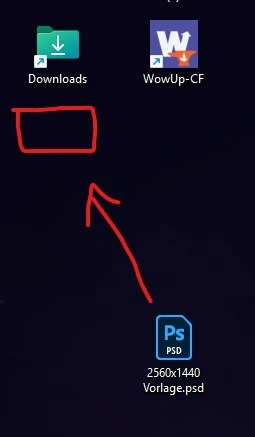
The problem is: as soon as I change a Photoshop file and then save it, the icon automatically jumps to the left side (1st monitor) under the next desktop icon. I've never had that before and it's really annoying for me. I've even reinstalled Windows. But that didn't help either.

Does anyone know how I can turn this off? Is there a setting in Photoshop? I use the latest version available. So I have a subscription to Adobe. Since I also work a lot with Photoshop, it's annoying when I save in between and the file keeps jumping back to the 1st monitor and I have to search for it.

I've tried a lot. Even in "View", when you right-click on the desktop, the option "Automatically arrange icons" is deactivated. As I wrote, I reinstalled Windows. I searched through the settings, but I don't know what to do. And I found out 3 more things:

  •  This is NOT the case with links! It has to be the original file, i.e. a document, image or Photoshop file.
  • And I have the same problem in normal folders too!!! I can't even put the file in a folder. Then, for example, position 2 jumps to the very back of the folder....
  • Also only tested with 1 monitor, same thing.

Totally strange... It's ONLY with Photoshop files. Not with any other files like documents, Excel files or anything else. Maybe Photoshop can't cope with the new Windows Update 24h2? Or is there a setting in Photoshop that I have to deactivate?

More information:
Adobe Photoshop Version: 26.2.0 20241207.r.140 bc85906 x64
Operating system: Windows 11 64-bit
Version: 24h2 (Build 26 100.2605)
Version: 11 or higher 10.0.26100.2605

Thanks in advance for the help.

4 replies

davescm
Community Expert
Community Expert
January 28, 2025
VurubaAuthor
Inspiring
January 8, 2025

Unfortunately, I am still waiting for an answer. 😞

VurubaAuthor
Inspiring
January 28, 2025

To date, I have not received any help here... and I pay my subscription every month... to be honest, I don't think that's good support.

D Fosse
Community Expert
Community Expert
January 4, 2025

@Vuruba  Do not start multiple threads on the same subject! This is the third thread.


Could a moderator please lock this?

VurubaAuthor
Inspiring
January 4, 2025
quote

@Vuruba  Do not start multiple threads on the same subject! This is the third thread.


By @D Fosse


Hello, I did NOT make 3 posts. There are 2 and I only posted the second one in the correct category "Technical Problems". I really don't know what I did to you.

D Fosse
Community Expert
Community Expert
January 4, 2025

Again: I didn't start 3 threads... but 2. And so far I haven't received any real help or answer. Then please just delete the 1st thread in the discussions. And leave this post open. But I would still like to get some help....

quote

You have started 3 identical threads here. 


Aside from cluttering the forum, it discourages people from responding at all, because you have to watch 3 separate threads to make sure you have read all previous responses. 


By @D Fosse


OK, apologies, it seems there were only two. My bad.


But still, one is plenty enough.


This is your original thread:

https://community.adobe.com/t5/photoshop-ecosystem-discussions/help-photoshop-files-jump-back-to-the-1st-desktop-only-by-saving/td-p/15068328 

VurubaAuthor
Inspiring
January 4, 2025

Hello again, I've spoken to a few other graphic designers and also in a Photoshop forum. They also noticed a few things after the new Windows Update 24h2. Please check! It doesn't happen with any other file!

Be it Paint files, Excel files or even other free Photoshop files like GIMP. I ONLY have this with Photoshop! And then it can really only have something to do with Photoshop. And since others have now confirmed it to me, I would ask them to check it. I pay monthly for it and would like my problem to be looked at more closely.


Thank you.