Participant
December 23, 2021
Question

Please make Modify>Expand/Contract available in Actions!

  • December 23, 2021
  • 5 replies
  • 712 views

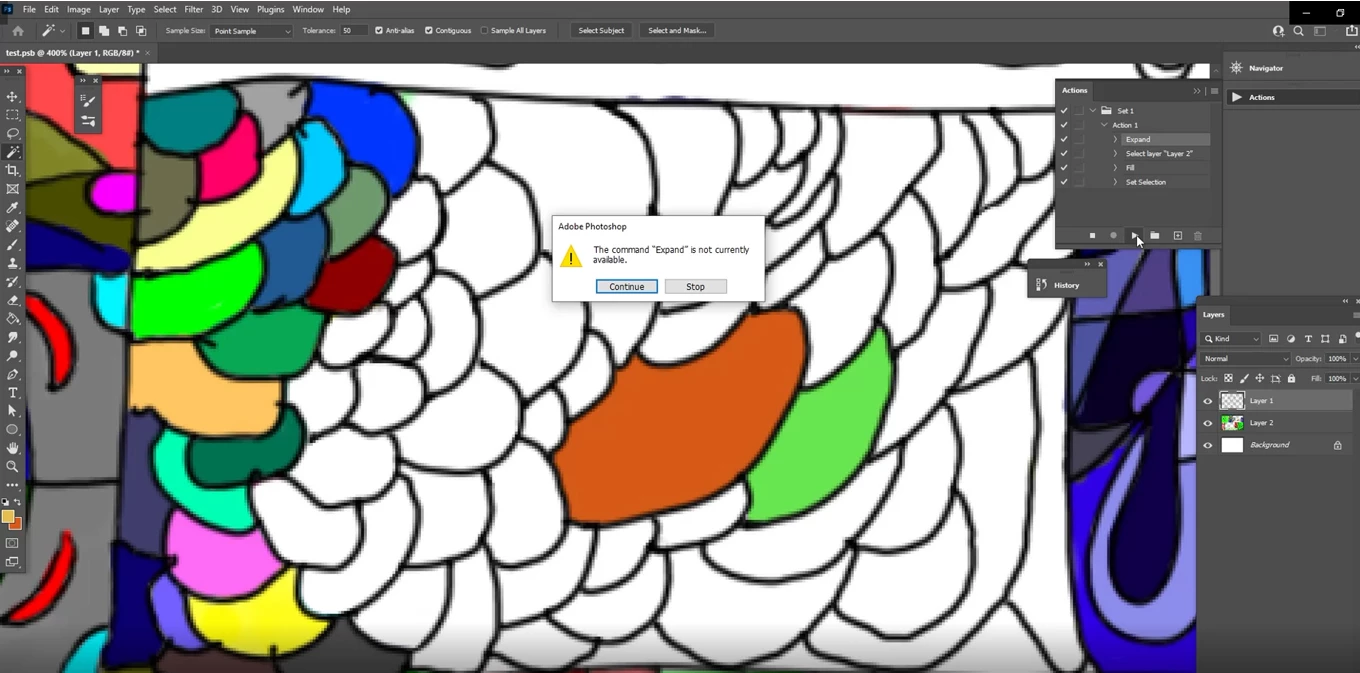
I've attached a video and screenshot showing this error. Right now Adobe Photoshop has an error message whenever we try to put Expand in an Action file. I teach Digital Art at an arts school, and my students and I would really like this fixed during the next Photoshop update please! I have contacted technical support several times about this issue but they send me to a link that does not work: http://feedback.photoshop.com


I hope someone on the Developer team will see this. I have devoted many hours to trying to get a Developer to see this.


This topic has been closed for replies.

5 replies

Legend
December 23, 2021

If you look closely in your movie, after you record your action the last step "Set Selection" of your action is selected. You hit play, and set selection removes your selection. You then hit play again, and there's no selection active, hence the expand step fails.


I'd also like to make a suggestion in process. You can modify the tools to do what you want without having to expand the selection or change layer selection each time to select and fill. My layer stack is similar to yours. A layer with painted lines. Dragging and dropping colors on the selections go to layers under the line drawing. See video:

Earth Oliver
Legend
December 23, 2021

Speaking of the Fill tool... when do we get this in Ps?


https://helpx.adobe.com/fresco/using/colors.html#dcol

JohanElzenga
Community Expert
Community Expert
December 23, 2021

I have several actions that use 'Modify - Expand'. But yes, you obviously need to have an active selection, otherwise that menu is not available and so the action can't invoke it either. It would be nice if you could add an "on error do this" command to an action, like you can do in scripting.


-- Johan W. Elzenga
Stephen Marsh
Community Expert
Community Expert
December 23, 2021
quote

It would be nice if you could add an "on error do this" command to an action, like you can do in scripting.


By @JohanElzenga


I think that we can using conditional actions, one conditional if option is "Document has selection". So the conditional could then branch out and run action "A" if a selection is active and or do nothing or action "B" if there was a selection. Of course "A" or "B" is running another action, which may require one to rethink how the action set and sub actions are built.

barbara_a7746676
Community Expert
Community Expert
December 23, 2021

If there is no active selection, then the Expand Selection command would not be available. You might consider inserting a Stop into the Action with instructions to first make a selection. You can insert a Stop from the Actions panel menu.

jane-e
Community Expert
Community Expert
December 23, 2021

I have contacted technical support several times about this issue but they send me to a link that does not work: http://feedback.photoshop.com

I hope someone on the Developer team will see this. I have devoted many hours to trying to get a Developer to see this.

By @BenMusic


Hi Ben,

I'm sorry technical support sent you to a forum that is read-only now. The Feedback forum was merged with this one in August 2021. You can tag your post as a Discussion, Idea, or Bug in this forum. The Ideas and Bugs are tracked by the developers. Adobe Staff have an "Employee" badge.


Jane

BenMusicAuthor
Participant
December 23, 2021

I've attached a video and screenshot showing this error. Right now Adobe Photoshop has an error message whenever we try to put Expand in an Action file. I teach Digital Art at an arts school, and my students and I would really like this fixed during the next Photoshop update please! This would save us sooooo much time! Watch the video below and you will see the benefit of having it work! This would give us shortcuts of our shortcuts. I have contacted technical support several times about this issue but they send me to a link that does not work: http://feedback.photoshop.com


I hope someone on the Developer team will see this. I have devoted many hours to trying to get a Developer to see this.


Please upvote!