Participant
March 5, 2021
Answered

pls actions tool save ctrl+z

  • March 5, 2021
  • 1 reply
  • 1061 views
It used to be. However, the function is not recorded from any time.

This topic has been closed for replies.
Correct answer JJMack

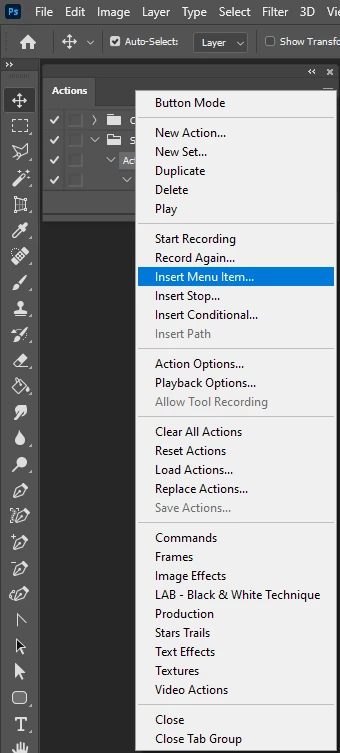
Ctrl+Z was a shortcut for Toggle last state now Adobe has changed it to Undo.  Some thing you do in Photoshop are not recorded by the Action Recorder. If Undo does not record you can most likely use the action palette's menu item Insert menu Item to  insert an undo step into your action.   I set Ctrl+Z to Toggle last state.
1 reply

JJMack
Community Expert
JJMackCommunity ExpertCorrect answer
Community Expert
March 5, 2021

Ctrl+Z was a shortcut for Toggle last state now Adobe has changed it to Undo.  Some thing you do in Photoshop are not recorded by the Action Recorder. If Undo does not record you can most likely use the action palette's menu item Insert menu Item to  insert an undo step into your action.   I set Ctrl+Z to Toggle last state.

JJMack
Participant
March 5, 2021

thx for help

but i try to
flatten image -> save -> undo 

Didn't work. so

I replaced it with a history window "Select previous histroy state" and it worked.

JJMack
Community Expert
Community Expert
March 5, 2021

Undo a save will not restore the file to before the flatten. You would need the step back in history for the way Save get recorded in history.  If you  look in history palette a (save) is added to the Flatten step the one state is like two steps "Flatten(save)" ...  Stepping back in history I seem to remember will record in actions.  If you step back in history like 5 steps recording an action I think you will see as  steps like Backup 5 history  recorded in your action,

JJMack