Answered
Pls. help . . .Photoshop... Auto Select the layers above the layer ( Scripts )
Hi All ... pls help me
Can you help me with scripts that will automatically select all layers above the selected layer when running the script?

Hi All ... pls help me
Can you help me with scripts that will automatically select all layers above the selected layer when running the script?
Thank you very much, sir @Stephen Marsh . . . Alt+Shift+. I didn't know you could use that shortcut
By @Thiha31203570tbl0
You're welcome, it's two separate keyboard shortcuts combined:
Select/target front (top) layer = Option + .
Add to continuous selection = Shift
Selecting layers via the mouse captures their absolute name in the action, which isn't useful when running the action on other images with different layer names. Recording the action with keyboard shortcuts doesn't have this limitation.
Relative Layer Keycuts:
Select/target front (top) layer = Option + .
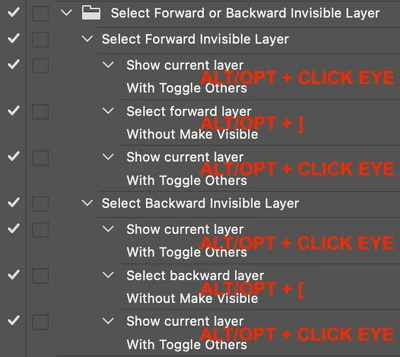
Select/target next layer up = Option + ]
Select/target next layer down = Option + [
Select/target back (bottom) layer = Option + ,
Move current target layer to front (top) layer = Command + Shift + ]
Move current target layer up = Command + ]
Move current target layer down = Command + [
Move current target layer to back (bottom) layer = Command + Shift + [
Windows users would swap the Command key for Ctrl and the Option key for Alt
Keep in mind that these keyboard-shortcuts are affected by layer visibility, one has to use extra steps to deal with invisible layers, such as:
Already have an account? Login
Enter your E-mail address. We'll send you an e-mail with instructions to reset your password.

 AdChoices