Inspiring
November 9, 2019
Answered

plugins greyed out

  • November 9, 2019
  • 4 replies
  • 3031 views

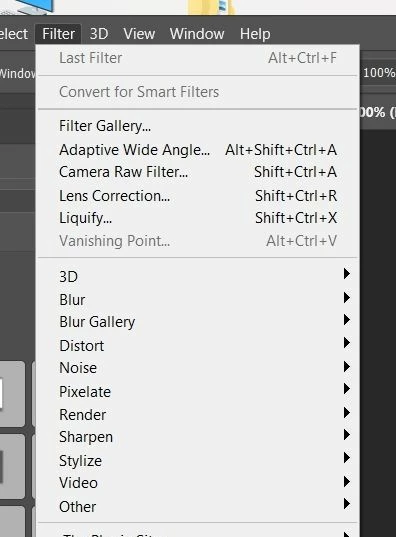
certain filters i cannot use on a smart object.I can use them on a rasterized layer but as soon as i convert to a smart object, they

become unavailable.The problem started after i contacted support  regarding a problem with mp4 in cc2019

they made me change all kinds of settings to my photoshop and update the grafic driver nvidia GTx 1060

sadly enough the video problem was not resolved, but I got the plugin problem on top.
This is now months ago and still no help.I installed cc2020 next to cc2019 but have the same problem.


please, can anybody help


This topic has been closed for replies.
Correct answer Jeff Arola

The only thing that comes to mind is at some point you used an adobe script called EnableAllPluginsForSmartFilters.jsx.


4 replies

Jeff Arola
Community Expert
Jeff ArolaCommunity ExpertCorrect answer
Community Expert
November 11, 2019

The only thing that comes to mind is at some point you used an adobe script called EnableAllPluginsForSmartFilters.jsx.


bijouzAuthor
Inspiring
November 12, 2019

Jeff, you are a GENIUS!! THANK YOU THANK YOU THANK YOU!!! happy as a kid now 🙂

Been struggling with this for a year now! can't believe this is finally solved .x

davescm
Community Expert
Community Expert
November 10, 2019

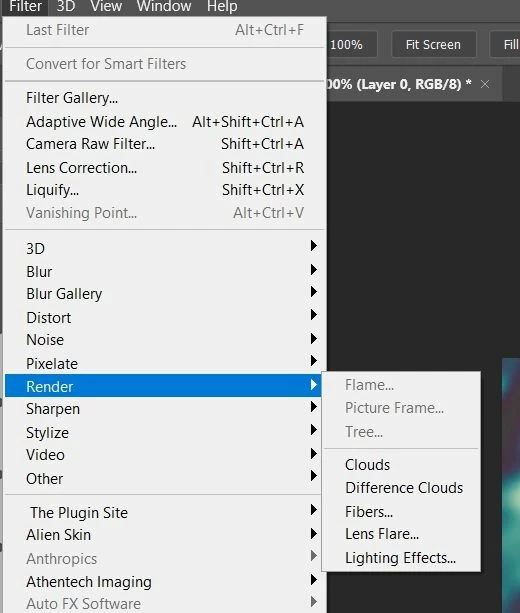
Vanishing point is greyed in all three versions for Smart Objects.
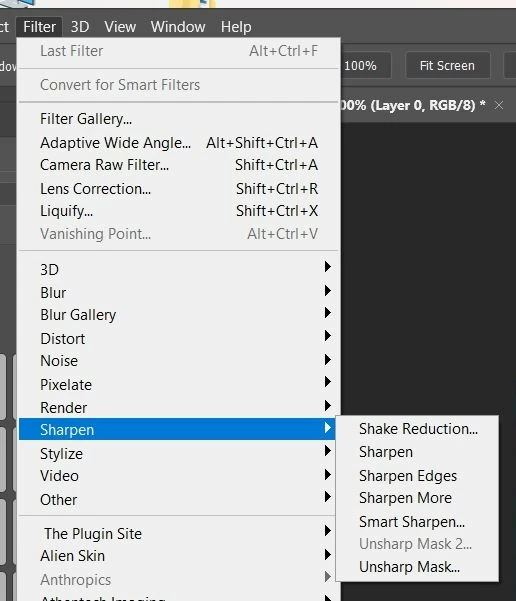
Unsharp Mask 2 is not a standard filter, so I don't have it.

Dave

jane-e
Community Expert
Community Expert
November 10, 2019

Unsharp Mask 2 is a Gimp plugin and is not part of PS.

~ Jane

bijouzAuthor
Inspiring
November 11, 2019

.I never installed a gimp plugin.You can find unsharp mask 2 under the "sharpen" menu.How can a third party plugin be part of the photoshop menu? And what about lens blur? Thay is a photoshop filter, right? that one i can also not use on a smart object

davescm
Community Expert
Community Expert
November 10, 2019

Now I'm puzzled, as I see the same for smart objects on all three versions - all the same 8 bit image converted to a smart object:


Dave

bijouzAuthor
Inspiring
November 10, 2019

Well, for me it works in cc2018 ( still today) and has worked in cc2019 for a while untill they made me do the update.

Does the unsharp mask 2 and vanishing point work for you on a smart object? 

davescm
Community Expert
Community Expert
November 10, 2019

Hi, What you describe is normal. Not all Filters work with Smart Objects, including Vanishing Point, and the three Render Filters (Flame, Picture Frame and Tree)


Dave

bijouzAuthor
Inspiring
November 10, 2019

Hey dave, thanks for the fast response
It's not normal.I know the flame and picture frame doesn't but the vanishing point, lens blur and unsharpen two defenitly does.It also works in my cc2018.And it's not just adobe filters that does not work.Alot of my external plugins that work in cc2018 on smart objects, don't work on them in cc2019 and cc2020.I work in RGB and 8 bit.
And it just stopped working after support made me update my graphic card and put settings back to default.Before all filters worked fine in cc2019 too on smart objects.I will send a screenshot of my cc2018.
I will add the screenshots of cc2018 where you can see that all filters work on the rasterised layer and also on the smart object.I also include screenshots where i am in teh dialog box of lens blur and vanishing point when the layer is a smart object.