
Participant
January 24, 2018
Answered

PNG opens incorrectly in Photoshop CC (2018) v19.1

  • January 24, 2018
  • 2 replies
  • 3162 views

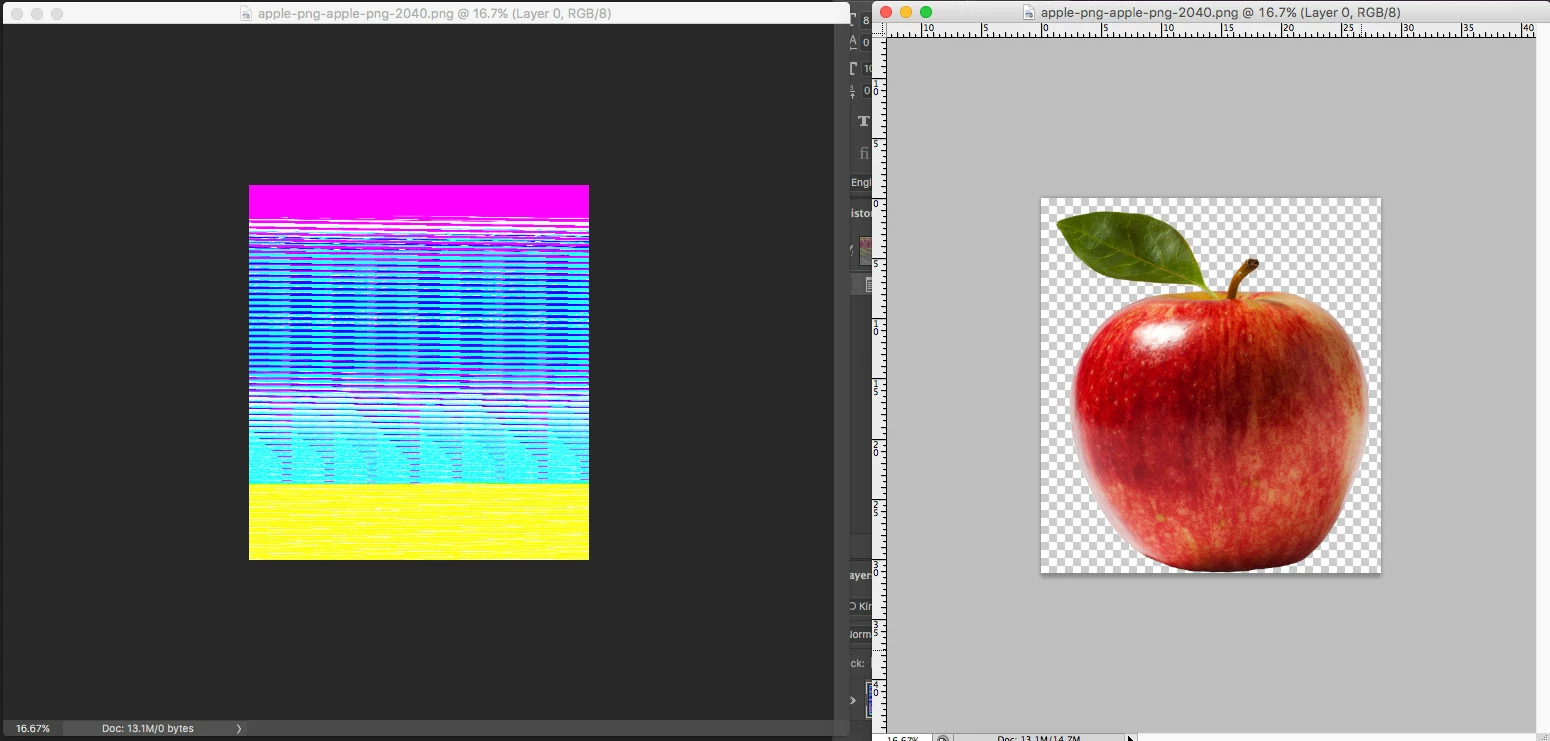
I am trying to open a .png file and it won't open correctly.  I've tried multiple different .png files from different sources and no luck.  I've even saved an image from CC and tried to open it with the same results.  Here is screenshot of CC (left) next to CS4 (right) where it opens just fine:

I've searched the web for a solution with, but have found none.  Any help is greatly appreciated!

    This topic has been closed for replies.
    Correct answer Mohit Goyal

    This worked for me, however when I went to export my artboards out, I was unable to load that export panel. So had to go back in and recheck this. Does anyone know when an update will be released sorting this out with Photoshop?


    Hi All,

    This problem should be fixed after the Photoshop 19.1.2 update. You can install this update via Creative Cloud desktop app.

    Also, you can refer the list of the fixed issues after the Photoshop 19.1.2 update, here: Fixed issues in Adobe Photoshop CC

    Regards,

    Mohit

    2 replies

    Participant
    February 15, 2018

    Having this exact issue too. Works fine opening the PNG in any other software (including InDesign and Illustrator), any solutions?

    c.pfaffenbichler
    Community Expert
    Community Expert
    February 15, 2018

    Uncheck

    Preferences > Plug-Ins > Allow Extensions to Connect to the Internet

    Preferences > Plug-Ins > Load Extensions Panels

    and restart Photoshop.

    Mohit Goyal
    Community Manager
    Mohit GoyalCommunity ManagerCorrect answer
    Community Manager
    March 14, 2018

    This worked for me, however when I went to export my artboards out, I was unable to load that export panel. So had to go back in and recheck this. Does anyone know when an update will be released sorting this out with Photoshop?


    Hi All,

    This problem should be fixed after the Photoshop 19.1.2 update. You can install this update via Creative Cloud desktop app.

    Also, you can refer the list of the fixed issues after the Photoshop 19.1.2 update, here: Fixed issues in Adobe Photoshop CC

    Regards,

    Mohit

    JJMack
    Community Expert
    Community Expert
    January 24, 2018

    That looks like you may be having a Graphic adapter problem see if there is a newer device driver available for your display adapter. If there is try installing it on you machine.

    JJMack
    Participating Frequently
    February 15, 2018

    what does that mean????