tepperleen
Participating Frequently
August 3, 2018
Answered

PNG with transparent background shows white background in Finder

  • August 3, 2018
  • 2 replies
  • 5863 views

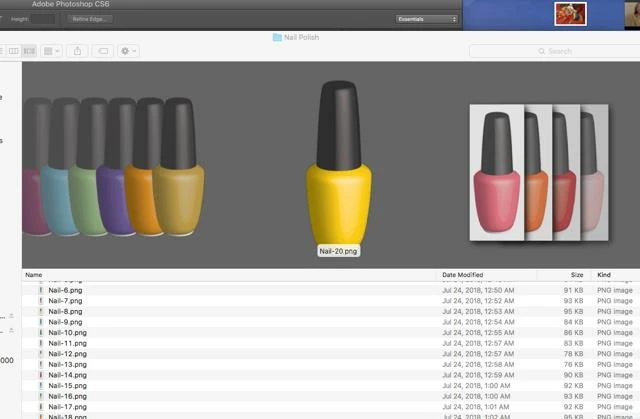
I hope I can explain this clearly.  I'm making a bunch of .pngs in PhotoShop.  Originally I was using File save for web, but the image size was exploding.  So now I'm just using file save as png and I'm getting exactly what I want.  Great. The pngs have a transparent background.  I'm sure of it.  But as you can see, in my Finder window, the images on the right (the ones I made using file save as png) look like they have a white background even though they don't show that way when pasted in anywhere, and the images in the center and to the left (the ones I made using using File save for web) show no background.  Can someone explain this to me?  And is there anything I can do to fix it?  First post here, and I'm not a graphics genius, so be kind.  Thank you. 
This topic has been closed for replies.
Correct answer Jeff Arola

Interesting, so I'm not crazy perhaps.  I have the same OS (El Capitan 10.11.6). 

Let me ask you this.  I'm really a novice.  I don't mind using save for web, but when I save my 2x5 image at 300 dpi, when I open the PNG it is now 8 by 20.  I want my image to be 2x5 at 300 dpi, but I can't get it that size unless I do save as. 

Or maybe I just shouldn't worry that the image is showing with a white background in finder since it's transparent everywhere else. 

Thanks so much for your time.  I really appreciate it. Probably off to bed soon, but I'll check back in the am. 


Perhaps your using windows at work?

Anyway, i tried a png with transparency saved from photoshop cs2 using File>Save As>PNG on windows xp (a virtual machine since i don't have access to a real windows box right now) and the png shows transparency in Cover Flow on a mac.

2 replies

Omar.Fathy
Community Expert
Community Expert
August 3, 2018

The file saved by Save As command is larger in size and you GPU may have a problem previewing these files in finder.

But when save it by Save for web it is a smaller file size and no problem for GPU to preview it in Finder.

tepperleen
Participating Frequently
August 3, 2018

It's actually the opposite.  The files created with save for web look right in the Finder, the files created with save as look like they have a white background, even though they don't. 

Participant
October 31, 2023

Perhaps your using windows at work?

Anyway, i tried a png with transparency saved from photoshop cs2 using File>Save As>PNG on windows xp (a virtual machine since i don't have access to a real windows box right now) and the png shows transparency in Cover Flow on a mac.


Well that answer  was fcking useless. 

gener7
Community Expert
Community Expert
August 3, 2018

I'm not seeing this with pngs generated by "Save As" in Photoshop CC 2018-19.1.5.

What version are you using?

If Save As Png is not doing the job properly, I would recommend the free SuperPng which when installed, will bbe an option in Save As.

SuperPNG

Chuck Uebele
Community Expert
Community Expert
August 3, 2018

Looks like the OP is using CS6, Gene.

gener7
Community Expert
Community Expert
August 3, 2018

https://forums.adobe.com/people/Chuck+Uebele  wrote

Looks like the OP is using CS6, Gene.

Yep. First screenshot.Well perhaps superpng might clear it up.