JH86
Participant
February 27, 2020
Answered

Polygon lasso tool creating random points

  • February 27, 2020
  • 1 reply
  • 1489 views

Hi everyone, 


One of my team is having issues with the Polygon lasso tool - when he's clicking to create points, the cursor randomly shoots off and creates a point on the other side of the document. I've tried adjusting his mouse speed, making sure he's not double clicking etc. He's on a PC running windows 7 (i'm pressuring for an upgrade) using the lastest version of Photoshop. 


Anyone know what could be happening?


Many Thanks 
This topic has been closed for replies.
Correct answer

Hi

Assuming your on version 21.1, it's a known issue and has been reported to Adobe

https://feedback.photoshop.com/photoshop_family/topics/ps-21-1-every-drawing-action-snaps-to-upper-l...

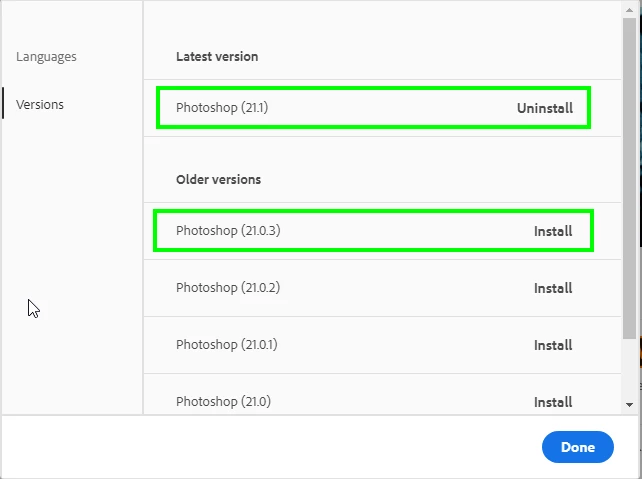
You can revert back to version 21.0.3 from the CC app until Adobe fixes the issues with this new update

1 reply

Correct answer
February 27, 2020

Hi

Assuming your on version 21.1, it's a known issue and has been reported to Adobe

https://feedback.photoshop.com/photoshop_family/topics/ps-21-1-every-drawing-action-snaps-to-upper-l...

You can revert back to version 21.0.3 from the CC app until Adobe fixes the issues with this new update

Participant
March 4, 2020

Thanks Ged! It works!