Participant
March 3, 2019
Answered

Possible to change brush & eraser cursors separately?

  • March 3, 2019
  • 2 replies
  • 2319 views

I've been messing around with the cursor preferences to comfort my drawing better and I'm comfortable with setting my brush to the 'precise/crosshair' mode but I don't like it on my eraser as it is hard to see what size my eraser is when erasing things. Is it possible at all to change the eraser to show a circle rather than a crosshair so the crosshair isnt stuck on both the brush AND eraser?

Thanks!
This topic has been closed for replies.
Correct answer Trevor.Dennis

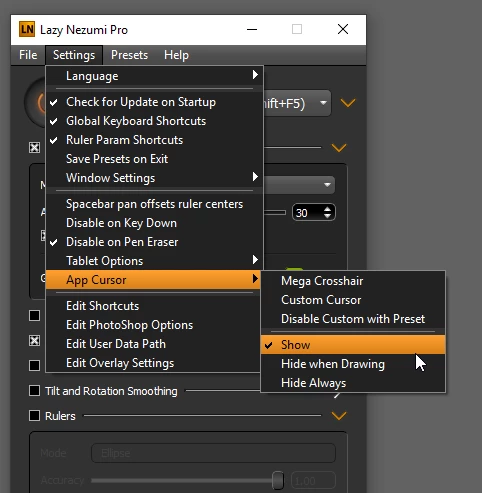
If you are using Windows, then I 'think' you can do it with Lazy Nezumi Pro.  It has a Hide when drawing setting associated with custom cursor, and this can be disabled on a tool by tool basis.

If you use one of Kyle Websters eraser presets that are free to CC users via his Mega Pack, then you see the outline.  It's actually a _very_ good eraser preset.

Now while I am a big user and fan of LNP, I do not use this particular function, so you'd have to work it out, but you get a trial period, and it's only $35 last I looked.   It's a must have add-on for tablet users and illustrators anyway.

https://lazynezumi.com/

The information on the custom cursor is on page 12 of the Documentation

https://lazynezumi.com/downloads/LazyNezumiProDoc.pdf

If you are a Mac user, then I just wasted five minutes as LNP does not come in a Mac flavour.

2 replies

Trevor.Dennis
Community Expert
Trevor.DennisCommunity ExpertCorrect answer
Community Expert
March 4, 2019

If you are using Windows, then I 'think' you can do it with Lazy Nezumi Pro.  It has a Hide when drawing setting associated with custom cursor, and this can be disabled on a tool by tool basis.

If you use one of Kyle Websters eraser presets that are free to CC users via his Mega Pack, then you see the outline.  It's actually a _very_ good eraser preset.

Now while I am a big user and fan of LNP, I do not use this particular function, so you'd have to work it out, but you get a trial period, and it's only $35 last I looked.   It's a must have add-on for tablet users and illustrators anyway.

https://lazynezumi.com/

The information on the custom cursor is on page 12 of the Documentation

https://lazynezumi.com/downloads/LazyNezumiProDoc.pdf

If you are a Mac user, then I just wasted five minutes as LNP does not come in a Mac flavour.

anguyeAuthor
Participant
March 4, 2019

No worries, I have windows so you didn't waste your time trying to help out! This is as close as things can get to customization for cursors in photoshop I assume. So this does help in some way, thanks!

Michael Bullo
Community Expert
Community Expert
March 3, 2019

Activating the Caps Lock key in Photoshop will show the cross hairs for both the Brush and the Eraser tools. Perhaps you could leave both tools showing the circle by default and just hit the Caps Lock key whenever you want the cross hairs.

anguyeAuthor
Participant
March 4, 2019

Not necessarily trying to alternate between caps lock as thats extremely tedious especially if Im illustrating and require quick strokes between either the brush or the eraser (I use keyboard shortcuts between 'E' and 'B'). Id have to continuously keep tapping caps lock after a stroke. Im really just trying to see if its possible to change the cursors separately between brush and eraser so that my brush can be crosshair and my eraser a circle without having tapping caps lock all the time.

Bojan Živković11378569
Community Expert
Community Expert
March 4, 2019

There isn't variable preference setting which will instruct Photoshop to use precise cursor with only some tool(s) if that's what are you looking for.