nyds0806
Known Participant
February 25, 2018
Answered

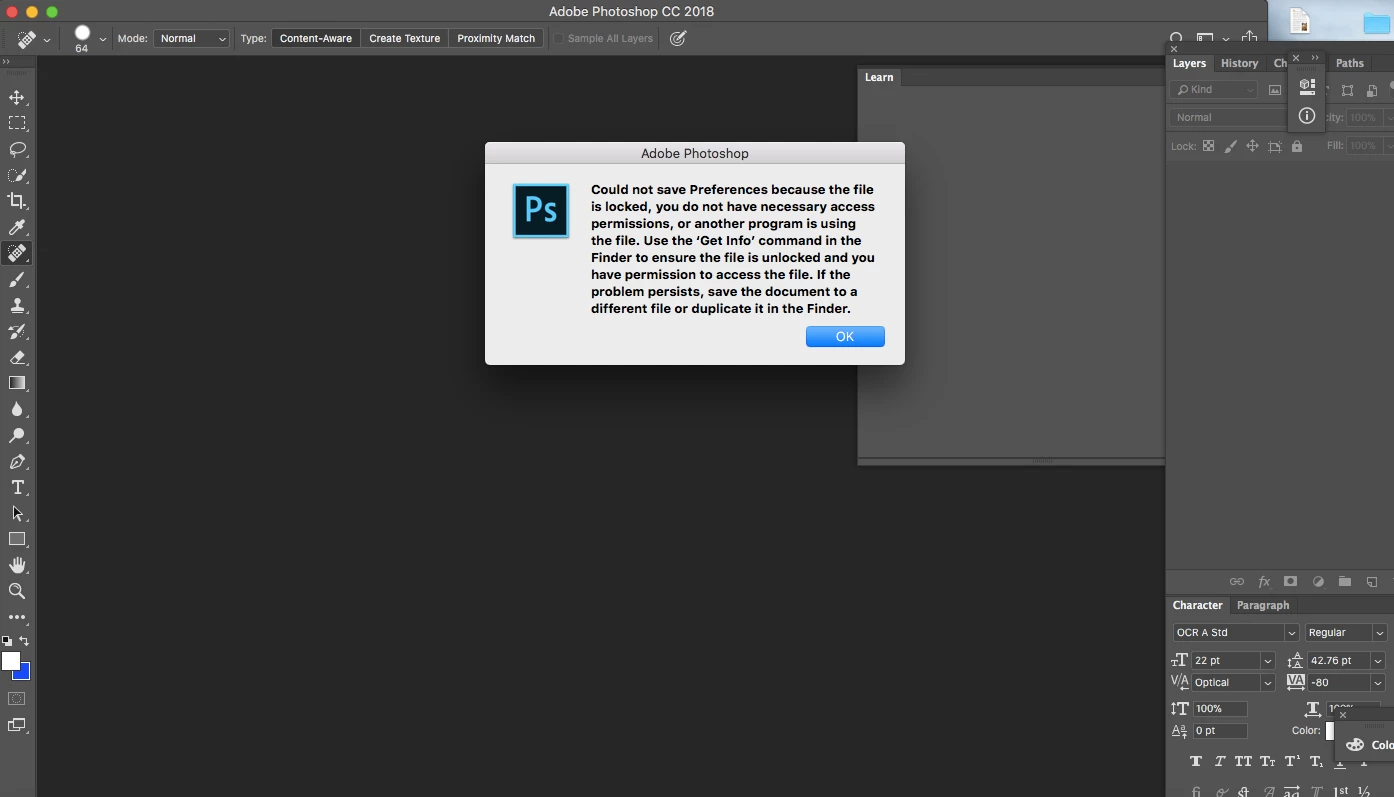
Preferences issue

  • February 25, 2018
  • 2 replies
  • 1093 views

Preran, this is a recurring issue. What can you do to help me?
    This topic has been closed for replies.
    Correct answer Barb Binder

    Ok, so try clicking the yellow padlock on the lower right (so that you can make changes), and change everyone (last line in Sharing and Permissions) to Read and Write. Then try restarting Photoshop, and closing it. Are you still getting the error message?

    ~Barb

    2 replies

    Barb Binder
    Community Expert
    Community Expert
    February 25, 2018
    1. On your Mac, open Finder.
    2. Hold the Opt key and choose Go > Library
      From there, navigate to Preferences > Adobe Photoshop CC 2018 Settings
    3. Right click the Adobe Photoshop CC 2018 Settings folder > Get Info
    4. What do your settings show?

    ~Barb at Rocky Mountain Training
    nyds0806
    nyds0806Author
    Known Participant
    February 25, 2018

    See below:

    Barb Binder
    Community Expert
    Community Expert
    February 25, 2018

    That worked, thank you.


    Excellent! You might want to go back to Get Info and click that gold lock button again to prevent inadvertent changes in the future.

    And so glad I was able to help you resolve this.

    ~Barb

    ~Barb at Rocky Mountain Training
    JJMack
    Community Expert
    Community Expert
    February 25, 2018

    Check your user ID file systems permissions you should have write access to your user ID Photoshop preferences folder.  I use windows do not ask me how to do that on a mac.

    JJMack
    nyds0806
    nyds0806Author
    Known Participant
    February 25, 2018

    My MacBook Air says "I don't have the necessary permissions to change permissions." 

    JJMack
    Community Expert
    Community Expert
    February 25, 2018

    You need to find out how to administer your machine. Read up on OSX

    JJMack
