Known Participant
December 22, 2019
Answered

Presets

  • December 22, 2019
  • 2 replies
  • 717 views

What happned to all the presets  PS used to have. Everything is trees, plants and clouds. I miss the old presets. I had come back to renting photoshop ealier this month.

 

This topic has been closed for replies.
Correct answer Chuck Uebele

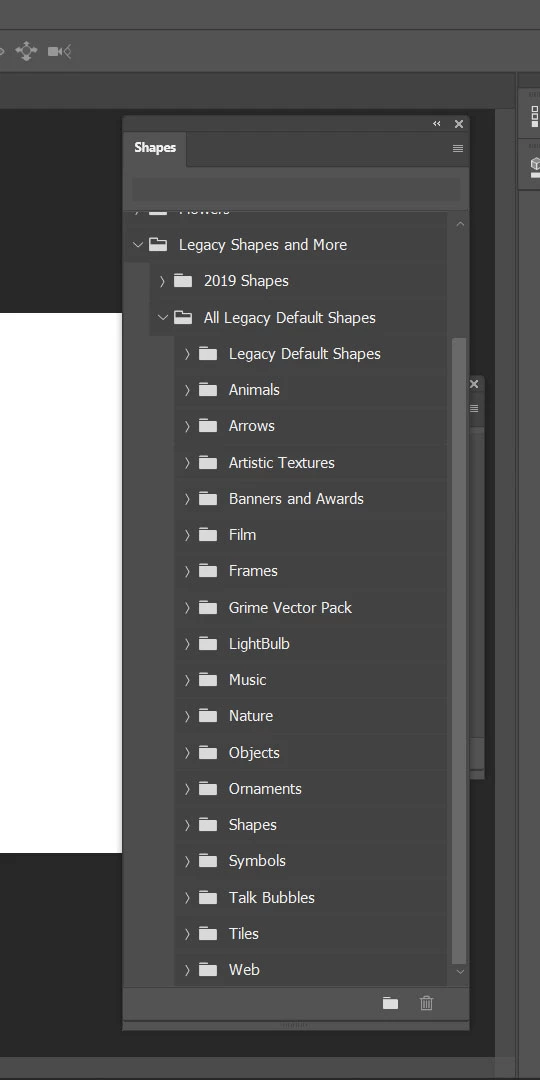
Click on the panel menu (hamburger icon) and select "Legacy Shapes and More." Then open, "All Legacy Default Shapes."
2 replies

Chuck Uebele
Community Expert
Chuck UebeleCommunity ExpertCorrect answer
Community Expert
December 23, 2019

Click on the panel menu (hamburger icon) and select "Legacy Shapes and More." Then open, "All Legacy Default Shapes."

Known Participant
December 23, 2019

I didn't find a hamburger shaped icon but just your response help me to find a way to restore so thank you. I went to windows and clicked on the presets to go to (shapes, patterns, etc) and found restore legacy brushes, etc. 


Chuck Uebele
Community Expert
Community Expert
December 23, 2019

Glad that you got it. The hamburger icon is the 3 lined icon on the right side of the shapes panel, directly opposite the word shape, in my above screen shot.

Chuck Uebele
Community Expert
Community Expert
December 22, 2019

They're all still there in the various folders under the new preset panel. Just drill down to find the ones you want. There are tons of them.

Participant
December 23, 2019

Hi,


Im having a problem finding the default presets for custom shapes. I  just have leaf/trees,boats,wild animals. There use to be so many and now they are gone. I click on the gear icon but I dont have the option to select all. It just says restore or import. Any help would be appreciate or a point in the right direction!