JulieHF
Inspiring
March 22, 2020
Answered

Prevent crop making me use flatten image in P'shop2020

  • March 22, 2020
  • 5 replies
  • 2993 views

When I crop an image in Photoshop 2020, it makes a new layer.

How do I disable that so that I don't have to flatten the image?

This topic has been closed for replies.
Correct answer Jeff Arola

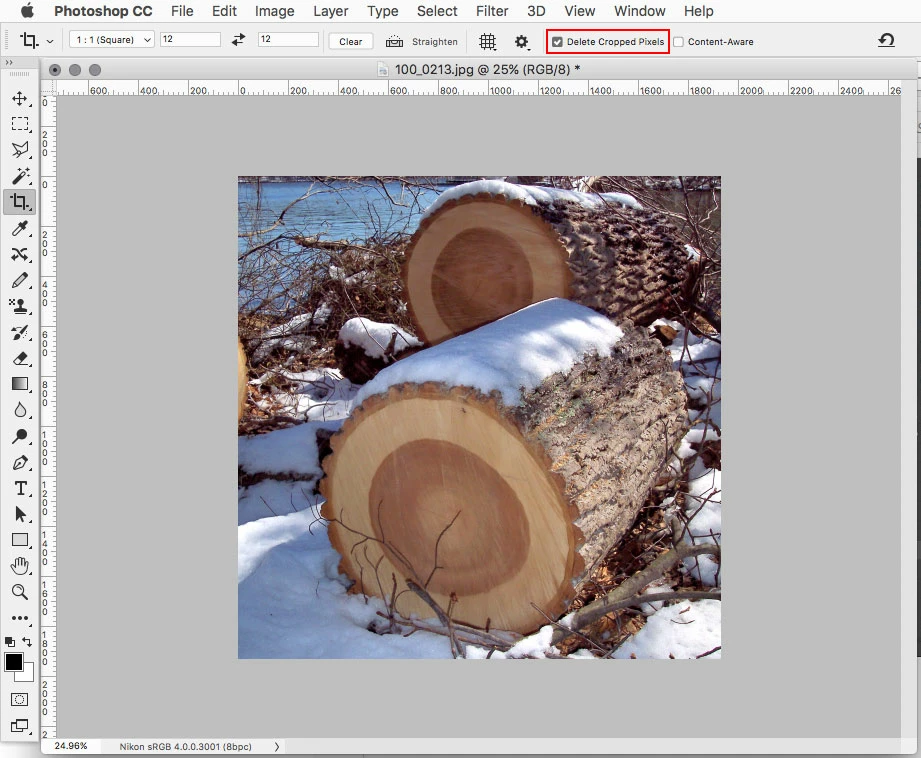
In the Crop Tool options check Delete Cropped Pixels
 

5 replies

Participant
August 8, 2022

Thank you, Jeff Arola.  Your solution is elegantly simple, and IT WORKS.

Jeff Arola
Community Expert
Jeff ArolaCommunity ExpertCorrect answer
Community Expert
March 24, 2020

In the Crop Tool options check Delete Cropped Pixels


JulieHF
JulieHFAuthor
Inspiring
March 30, 2020

Bingo! Simplicity takes the gold star. Thank you so much.

JJMack
Community Expert
Community Expert
March 30, 2020

I see you did not see I had that checked in the three screen captures I posted.  So a picture is not always better than words.

JJMack
c.pfaffenbichler
Community Expert
Community Expert
March 23, 2020

Could you please post a screenshot taken at View > 100% with the pertinent Panels (Layers, Channels, Options Bar, …) visible? 

Is »Content-Aware« checked for example? 

Chuck Uebele
Community Expert
Community Expert
March 22, 2020

That is a preview layer for cropping only, once the crop is okayed, your layers return to normal.

JJMack
Community Expert
Community Expert
March 22, 2020

If its the crazy crop preview in  the layers palette you are referring to that Chuck wrote about. You can use the crop tool settings in to tool options bar to switch classic Crop tool.  That does not show that preview where the document looks lake a flattened layer over a solid fill background.  I never look at it anyway.  

JJMack
JJMack
Community Expert
Community Expert
March 22, 2020

If the crop tool or on menu Image>Crop is adding a layer or flatting your document something is messed up on your machine. Try resetting your Photoshop preferences see if the fixes your problems.

JJMack
JulieHF
JulieHFAuthor
Inspiring
March 22, 2020

How do reset the preferences?

JJMack
Community Expert
Community Expert
March 22, 2020

JJMack