
Participating Frequently
May 27, 2021
Answered

Print profiles

  • May 27, 2021
  • 4 replies
  • 4976 views

Hello All,

I'm attempting to simulate a device in proofing conditions, which i think basically means tell my Mac (or Photoshop) what printer and paper I am using.. however, mine is not in the list and 'other' is greyed out..


Any ideas?


Kind regards 
This topic has been closed for replies.
Correct answer Conrad_C

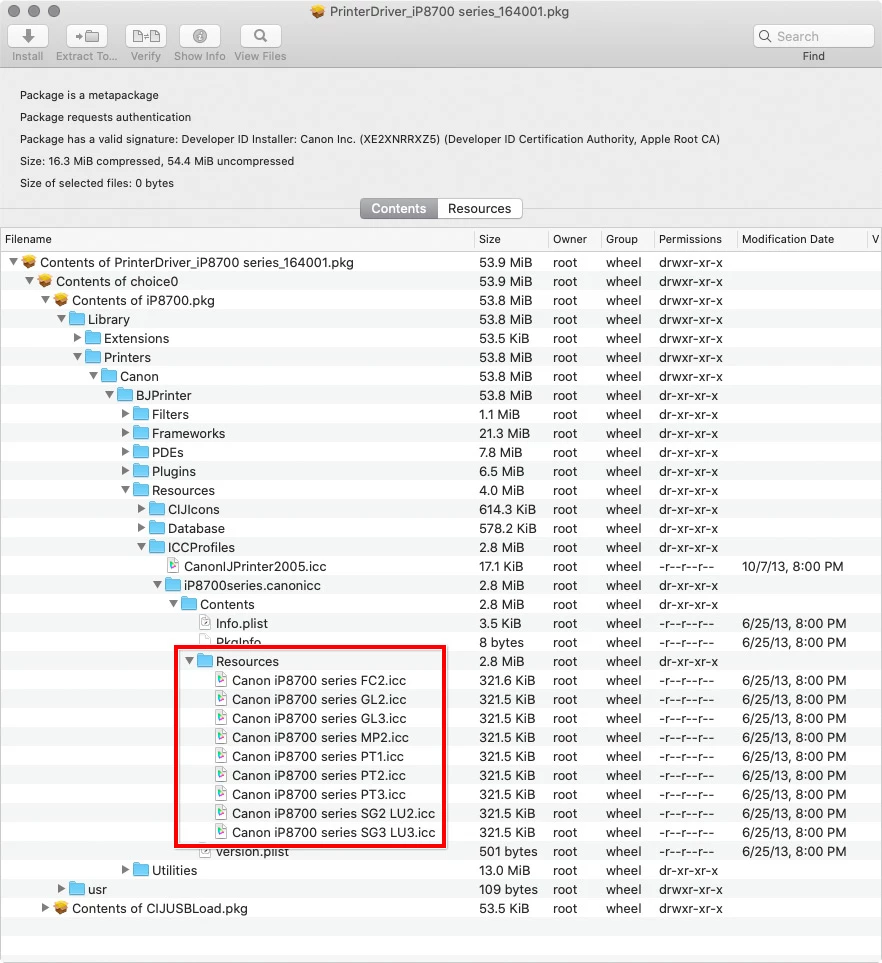
I do not own that printer, but out of curiosity I downloaded the Canon iP8700 driver Ver.16.40.1.0 dated October 2020 and inspected it in the Pacifist utility. That reveals that the installer does contain ICC profiles. Can you find profiles of those names (in the picture below) in any Adobe or Apple profile menus?


4 replies

Conrad_C
Community Expert
Conrad_CCommunity ExpertCorrect answer
Community Expert
May 27, 2021

I do not own that printer, but out of curiosity I downloaded the Canon iP8700 driver Ver.16.40.1.0 dated October 2020 and inspected it in the Pacifist utility. That reveals that the installer does contain ICC profiles. Can you find profiles of those names (in the picture below) in any Adobe or Apple profile menus?


Participating Frequently
May 27, 2021

Hey, yes actually, thanks for that. I did find those earlier on when i installed the new driver. But I was a bit confused as it wasn't saying it was modified today/ showing 2020(?) - so I don't know if I'm somehow using older ones. Either way, the paper I am using isn't in there annoyingly. I'm after this one, for the time being:


Out of interest though, can someone explain to me, if PP was in that list, or if i wanted GL3 for example, is that all I would need to do? That is the ICC for the paper, right? Do i need one for inks and printer make too? (As well as calibration obvs..).


cheers

Conrad_C
Community Expert
Community Expert
May 27, 2021

@Andre_jubert wrote:

Out of interest though, can someone explain to me, if PP was in that list, or if i wanted GL3 for example, is that all I would need to do? That is the ICC for the paper, right? Do i need one for inks and printer make too?


A profile (ideally) represents the overall printing conditions: Ink, paper, and printer driver settings.


As far as the dates being old, that is not unusual. It means many files in the printer driver have not needed to be updated, but if you were to inspect all of the files in the printer driver, you would probably find a few with a more current date, which were the reason for updating the installer package.

TheDigitalDog
Inspiring
May 27, 2021

@Andre_jubert wrote:

Hello All,

I'm attempting to simulate a device in proofing conditions, which i think basically means tell my Mac (or Photoshop) what printer and paper I am using.. however, mine is not in the list and 'other' is greyed out..


You want to 'simulate' one printer onto another (proofing or also known as Cross Rendering) or you just want to soft proof an image prior to printing on that one printer? 

In either case, you need an ICC profile to define the output conditions of one or both devices. 

Author “Color Management for Photographers" & "Photoshop CC Color Management/pluralsight"
Participating Frequently
May 27, 2021

The latter, cheers.

TheDigitalDog
Inspiring
May 27, 2021
Author “Color Management for Photographers" & "Photoshop CC Color Management/pluralsight"
Participating Frequently
May 27, 2021

Here's another random thought while i try to figure all this out. I just downloaded and reinstalled the latest drivers for my printer, wihch accorinding to Canon were released last year. It said it was all successful but when i locate my drivers in finder, and order by date modified, it is saying the drivers are from 2014.. I digress, this got me thinking regardless of the driver - does using my printer wirelessly, i.e. by Apple AirPrint, affect the outcome of the print at all?

Derek Cross
Community Expert
Community Expert
May 27, 2021

Soft proofing is a useful Photoshop facility, this YouTube how-to tutorial is by Rodney, a member of the forum:

https://www.youtube.com/watch?v=njFgYba3lHU


Legend
May 27, 2021

Do you have an ICC profile file for the deceive you want to proof? If not, you need to get it and install it. If you have it you must install it - Windows or Mac?

Participating Frequently
May 27, 2021

Hey, thanks for the reply.


Yes, I thought that was the case, but I can't seem to find one! Is it possible my printer doesn't have one? Its a Canon IP8750 - it's not in the pro range, but its defo not entry level - uses 6 inks I think. 


I use Canon inks and paper (currently) - I work on an uncalibrated 2015 4k iMac and use Lr mostly. up until now I have been letting my printer manage the colours but i am finding I am getting inaccurate results - usually an orange cast. I could adjust for it, but ideally I'd like to calibrate.


i've been looking at maybe getting an X-rite pro to calibrate my screen, but am I right in thinking I still need an ICC profile - or can the calibrator create that also?


Thanks

Derek Cross
Community Expert
Community Expert
May 27, 2021

You also need to get your monitor calibrated, X-rite is excellent.

Search online, probably from a third-party paper supplier, for ICC paper profiles such as this UK company: https://www.marrutt.com/component/finder/search?q=ICC+profiles&Itemid=101