walterl72035838
Inspiring
May 6, 2018
Answered

Print Quality Issues: iMac 2017 to Epson SC P600 (both new)

  • May 6, 2018
  • 1 reply
  • 2273 views

I am at wit's end. I cannot print a good photo on my new Epson Sure Color P600 printer.

Is there a link somewhere to the complete workflow and troubleshooting method for printing? I have a new printer, using Epson paper, inks and icc profiles.

Is there a support desk somewhere that can walk me through this?

I am willing to pay someone to do this for me at this point.

Scott Kelby's latest book is no help here.

Is there a link somewhere to the complete workflow and troubleshooting method for printing? I have a new printer, using Epson paper, inks and icc profiles.

Is there a support desk somewhere that can walk me through this?

I am willing to pay someone to do this for me at this point.

Thanks,

Walt

Winter Haven, FL
This topic has been closed for replies.
Correct answer walterl72035838

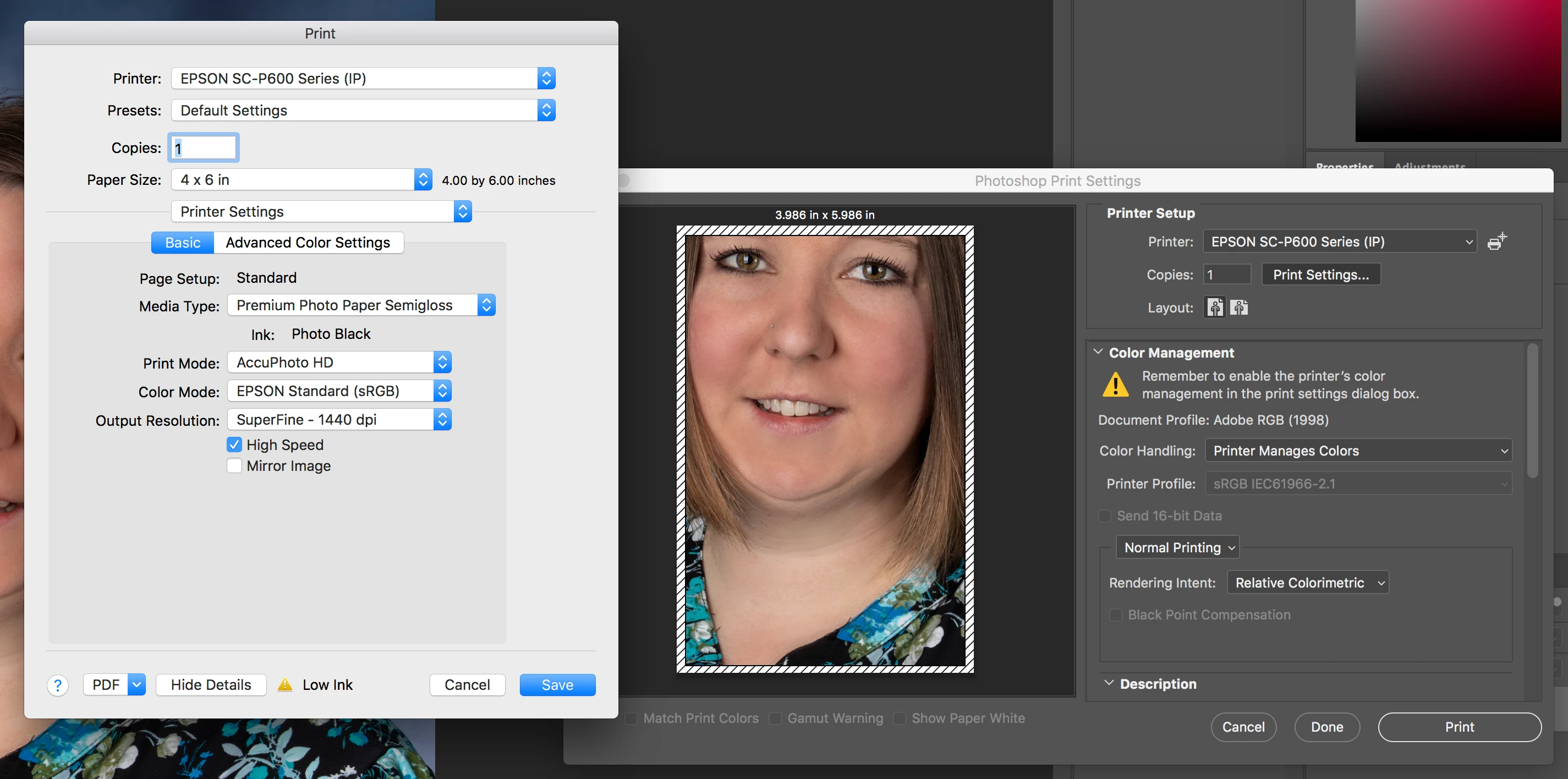
This is an Advanced Color setting within the Epson dialog window. I believe it is grayed out because it is set to Photoshop manages the colors.

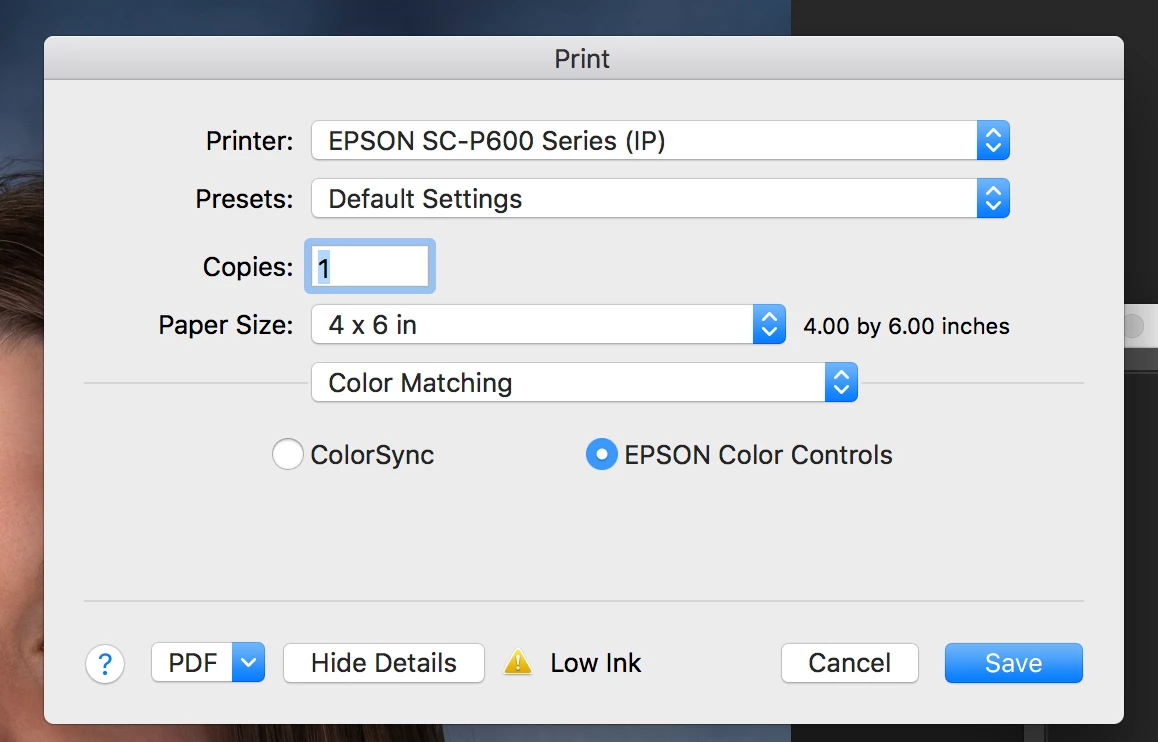
As a test I set the Print Dialog to EPSON Color Controls...

Then the Color Mode opened. Only two options available here...what is shown and "Off (No Color Management)". I have never used this option in the past with my prior Epson printers and Photoshop.


I found the issue...I am chagrined to admit I did not conduct a fundamental check of the printer. The printer has set idle for a few weeks without being used and it appears the 8th print head (black?) is clogged.

I ran the Nozzle Check in the Utilities folder. All print heads except for the last one looks great. I have ran the printer through several "Clean Print Head" operations with no success. I have sent a support e-mail to Epson. From the little research I have done on the Net, it appears that the P600 is prone to clogged print heads if not used at least weekly (or some unreasonable frequency for a weekend photographer).

I appreciate the support and felt I should share this lesson with everyone. If I remember, I will update this post with how Epson supports me.

Thanks

Walt

Winter Haven, FL

1 reply

Mylenium
Legend
May 6, 2018

It would help if you actually explained your issues rather than just throwing out generic "It doesn't work" comments and cries for help. Sounds like you have issues with your color management (or lack thereof), but since this is complicated stuff to begin with, a lot more info is required about actual settings, the files you work with and so on.

Mylenium

walterl72035838
Inspiring
May 6, 2018

Please excuse the "crying" and I didn't say "it doesn't work". I thought this was the place to ask for help...instead I get condescension.

I asked for help with the workflow (this is the place to ask for help?) and/or troubleshooting method to work through the issue. I have a beautiful portrait on Photoshop CC 2018 I try to print. The picture comes out faded, poor saturation, dark areas are too light, etc. I understand the complexities involved between what I see and translating that to ink on paper. So obviously, color management is probably a piece of it since iMac and Epson P600 are both super nice machines.

I am not asking anyone to spend hours working through this...I am experienced enough to know that is not feasible. I am asking for tutorials, reference documents, etc. that explain how to troubleshoot printing issues.

walterl72035838
walterl72035838AuthorCorrect answer
Inspiring
May 8, 2018

This is an Advanced Color setting within the Epson dialog window. I believe it is grayed out because it is set to Photoshop manages the colors.

As a test I set the Print Dialog to EPSON Color Controls...

Then the Color Mode opened. Only two options available here...what is shown and "Off (No Color Management)". I have never used this option in the past with my prior Epson printers and Photoshop.


I found the issue...I am chagrined to admit I did not conduct a fundamental check of the printer. The printer has set idle for a few weeks without being used and it appears the 8th print head (black?) is clogged.

I ran the Nozzle Check in the Utilities folder. All print heads except for the last one looks great. I have ran the printer through several "Clean Print Head" operations with no success. I have sent a support e-mail to Epson. From the little research I have done on the Net, it appears that the P600 is prone to clogged print heads if not used at least weekly (or some unreasonable frequency for a weekend photographer).

I appreciate the support and felt I should share this lesson with everyone. If I remember, I will update this post with how Epson supports me.

Thanks

Walt

Winter Haven, FL