
Inspiring
November 23, 2024
Answered

Printed colors don’t match

  • November 23, 2024
  • 1 reply
  • 487 views

I am printing a greeting card with a bright blue background using photoshop 25 and an Epson p700 printer. As per instructions I made sure that “ photoshop manages color “ was turned on in the printer settings. The bright blue turned a dull purplish blue. If I turn on “printer manages color” I get a slightly darker than I wanted but it’s blue. Shouldn’t photoshop managing the color echo what I created in photoshop? Very perplexing!
This topic has been closed for replies.
Correct answer D Fosse

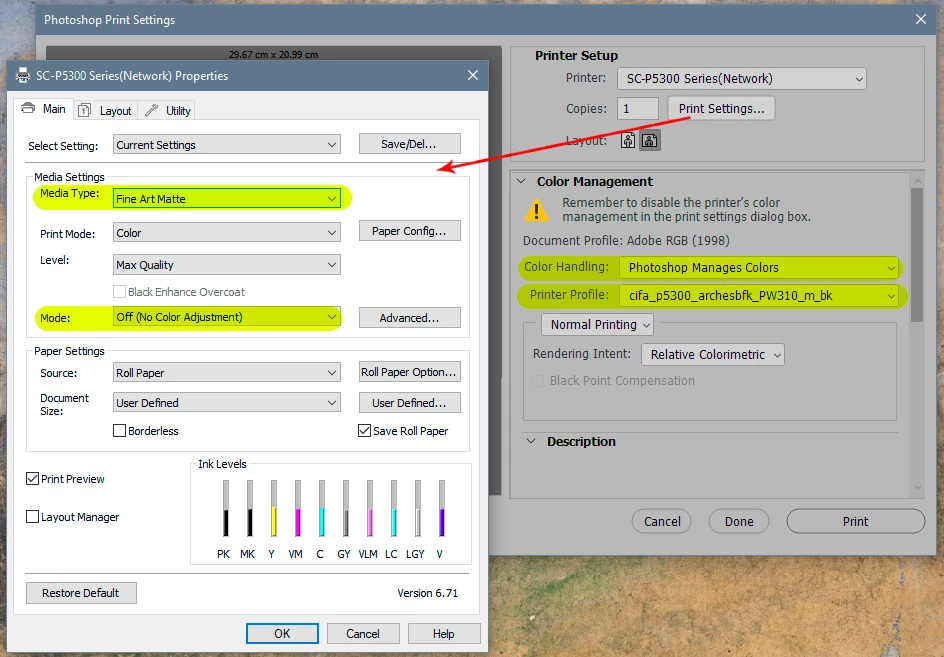
Photoshop only manages color correctly if you provide it with the correct printer profile for your printer and the paper you're printing on.


Here are the settings you need to get right:


1 reply

D Fosse
Community Expert
D FosseCommunity ExpertCorrect answer
Community Expert
November 23, 2024

Photoshop only manages color correctly if you provide it with the correct printer profile for your printer and the paper you're printing on.


Here are the settings you need to get right:


Inspiring
November 26, 2024

I am using Epson paper matched to an Epson profile. The print settings are correct. The printer simply hates the cerulean blue color.

NB, colourmanagement
Community Expert
Community Expert
November 27, 2024

@jessica schulman I hope I can help you understand why this might be: If your media setting in the printer driver [print settings] is correct and the ICC profile for the printer/ink/media is accurate and you've selected that ICC profile under Photoshop Manages Color, then that's going to give the maximum printed gamut you can achieve with that specific ink/printer/media combination.

There are colours which can be displayed on a screen which are way beyond the capability of ink on paper. You've maybe never seen that particular blue printed, right? Or, if you have, that was maybe on a glossy media and you're using perhaps a matte (which has a lower gamut).

More on gamut and profiles here


Photoshop has a feature to help you predict problem areas of colour gamut, it's under the menu: view/gamut warning/ custom. Set your printer's media profile there and check 'gamut warning' which will impose a tone (default is a grey tone) over areas which beyond printer capability. Perhaps you can tweak the colour to make it printable - that takes patience and practice.


I hope this helps
neil barstow, colourmanagement net - adobe forum volunteer - co-author: 'getting colour right'
google "neil barstow colourmanagement" for lots of free articles on colour management
Help others by clicking "Correct Answer" if the question is answered.
Found the answer elsewhere? Share it here. "Upvote" is for useful posts.