| I am finding that the images I am getting in hand are both much softer (not sharp enough) |
First of all, when applying and evaluating sharpness (on screen), you have to view the image at 100%, where one image pixel is represented by one screen pixel. Any other view will be inaccurate and misleading because the image has been scaled.
If you have viewed the whole image (fit on screen), it may well have given you the wrong impression of how sharp it is.
What are the pixel dimensions of the files you are printing?
When scanning, it is best to turn off sharpening in the scanning software, it usually does more harm than good.
The camera raw plugin for Photoshop (ACR) offers excellent sharpening – capture sharpening, which compensates for loss of sharpness in the scanning process, and output sharpening, which compensates for loss of sharpening in the printing process.
ACR is primarily designed for raw files, but you can open tiffs and jpgs in ACR by right clicking the thumbnail in Bridge and choosing Open in Camera Raw. If you're familiar with Lightroom, use that instead - it has all the features of ACR, but with a much better interface.
| as well as faded in colour compared to the image I see on my photoshop screen. |
Are you using the correct printer profile for the paper-printer combination?
Do the images have a color profile embedded? Click the little arrow bottom left in the taskbar to find out.
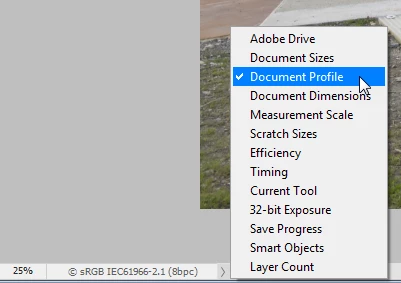
Photoshop is color managed, and uses the monitor profile to display colors correctly.
The best way to obtain an accurate monitor profile is by calibrating the monitor with a hardware calibrator.
Profiles delivered by monitor manufacturers are notoriously bad, and sometimes defective.
What make and model is your monitor?
What operating system do you use?


 AdChoices