
Printer dialog box forces 180 ppi to 72 ppi
Hi All,
I hope that all of you are well.
Here is my problem. I have created an image in Photoshop 21.1 at 180 ppi. When I tried to print it in PS 21.1.1, I first got to a screen that said "There was an error opening your printer. printing functions will not be available until you have selected a printer and reopened any documents." I then reopened file in a new session and hovered my arrow above File>Print. This "reset" the print settings and opened the Print Dialog Box. Since all the settings had been "reset" I had to select the printer, color management & etc to my preferred settings. The Print Resolution shows up as 72 ppi NOT the 180 ppi in my file. I therefore am unable to properly print the portion of the image that I want.
Below is a screen shot showing the "reset" printer dialog box before I made the changes to my preferred settings.
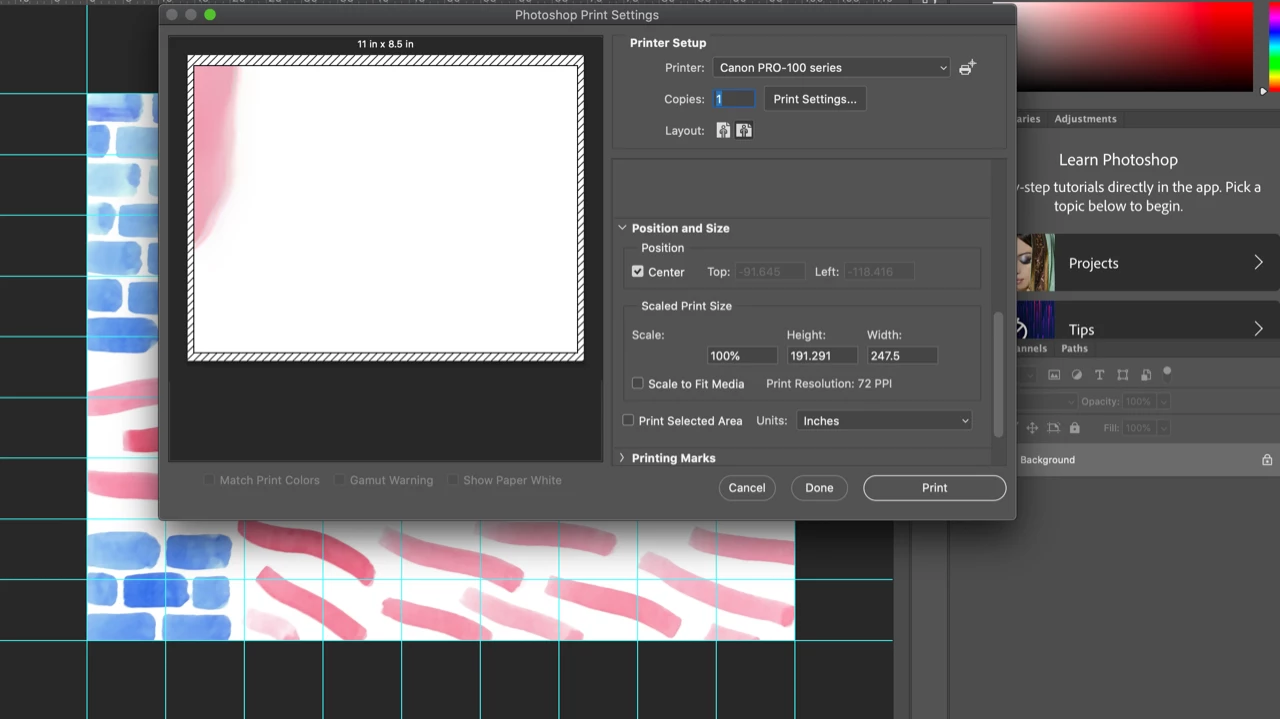
Any ideas? Is it the change up to PS 21.1.1 or ???
FYI - I use Mac OS Catalina 10.15.2, Canon Pro 100 printer and now PS 21.1.1.
FYI again - I upgraded to PS 21.1.1 and it solved the Dark Blue "Bleed" issue that was discussed in this link. The question there was is it a printer profile issue or a PS issue. My workaround was to use another Mac using High Sierra as a print driver. It was a PS issue and it appears that 21.1.1 was a solution for the "bleeding" colors but did it create a new issue with the forced push to 72 ppi?
Stay Well and Thank You,
Jim
 AdChoices