
Printing to 11x17 Paper from Photoshop
I am using Photoshop CC19.0, and trying to print out a picture on 11x17 paper. The only issue is that Photoshop only seems to offer or think I'm printing to an 8.5x11 sheet. I can't find any options anywhere to change the size of the paper I want to print on. The print settings button will bring up the printer's own dialog box, but that doesn't seem to have any effect on the outcome, because I can select the paper size, tray, and settings there and once I hit done to accept them and return to Photoshop's dialog box, it's still set to and displaying cropped on the same 8.5x11 page. It will print on the 11x17 paper I selected, but it's still cropped as if it was on an 8.5x11. Can someone help me out here? I must be missing something but I don't see what or where.
TLDR; how do I change the paper size on the left grey pane to be 11x17, and not 8.5x11.
T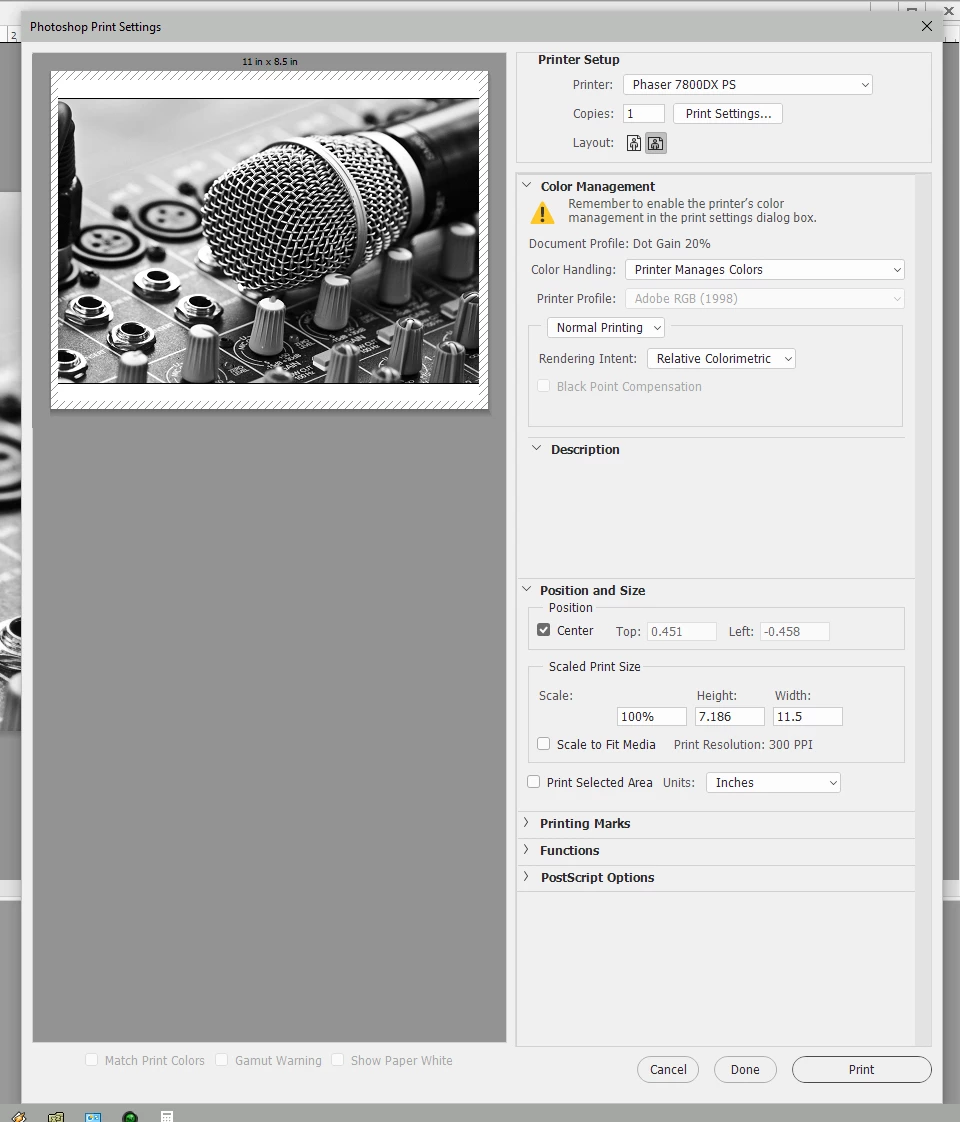
 AdChoices