Eloise_lfg
Participant
February 3, 2020
Question

Problème d'affichage barre de menu - Photoshop

  • February 3, 2020
  • 5 replies
  • 4595 views

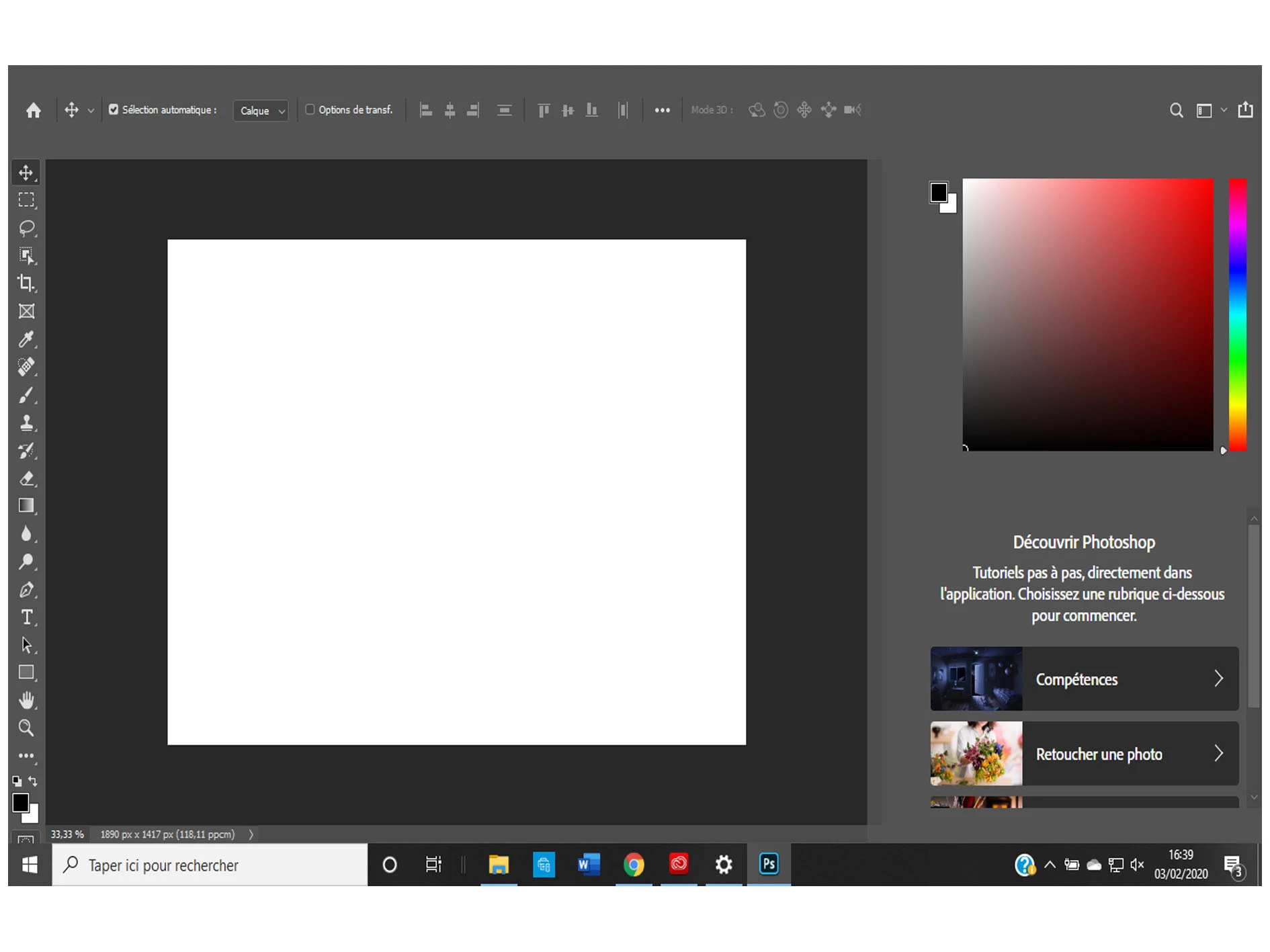
Bonjour, sur Photoshop j'ai un probleme d'affichage de l'interface, on ne voit pas la barre de menu en haut (fichier, edition, menu..) et la partie à droite au niveau des calques ne s'affiche pas correctement non plus..

Si vous pouvez m'aider quelles sont les solutions?

Merci d'avance
{Thread renamed by moderator}

This topic has been closed for replies.

5 replies

Participant
April 26, 2021

Idem pour aussi.

Toutes les mises à jour ont été faites, j'ai la dernière version.

Quelq'un a trouvé la solution ?

Participant
May 25, 2020

I had the same problème today !
I resolved the probème by besactivating the AMD driver

Participant
March 30, 2021

Toujours le même problème je n'ai pas trouvé de solution !

ruirocha1
Participant
April 6, 2020

meme problème pour moi......

je travail avec la version 2019 du coup!!!!!!!!

February 4, 2020

Hi

Have you tried updating your GPU driver from the manufacturers website, it will be either Intel, Nvidia or AMD, can you post your Photoshop system info, in Photoshop go to Help > System Info and hit the copy button and paste the entire thing into this thread

Eloise_lfg
Participant
February 4, 2020

Merci, pour le moment j'essai d'intallé les mise à jour amd radeon

glgpu[0].GLVersion="4.1"

glgpu[0].IsIntegratedGLGPU=0

glgpu[0].GLMemoryMB=1024

glgpu[0].GLName="AMD Radeon(TM) R5 Graphics"

glgpu[0].GLVendor="ATI Technologies Inc."

glgpu[0].GLVendorID=4098

glgpu[0].GLDriverVersion="22.19.180.1025"

glgpu[0].GLRectTextureSize=16384

Participant
March 25, 2020

Bonjour, j ai exactement le même problème, avez vous trouvé une solution ?

Sahil.Chawla
Adobe Employee
Adobe Employee
February 3, 2020

Hi there,

That shouldn't be happening, could you please let us know the version of Photoshop you're using?

Also, could you try resetting the preferences of Photoshop and let us know if it helps?  

https://helpx.adobe.com/photoshop/using/preferences.html


Note: Make sure that you back up all your custom presets, brushes & actions before restoring Photoshop's preferences. Migrate presets, actions, and settings


Regards,
Sahil

Eloise_lfg
Participant
February 4, 2020

J'ai la toute dernère version, 21.0.3, j'ai deja réinitialisé, désinstalé, tout nettoyé, reinstallé rien ne fonctionne..