
Participant
December 16, 2024
Answered

Problem loading .xmp presets in Photoshop Camera Raw

  • December 16, 2024
  • 1 reply
  • 1294 views

Hello everyone, where are the folders with the .xmp presets like Modern, Vintage, etc.? When I open Camera Raw in Photoshop, I can see these folders. I have a set of .xmp files that I want to load, but it doesn't allow me to. I would have to import them one by one. There should be a settings folder or something like that where I can create a new folder and place the .xmp files there.
Does anyone know the path?
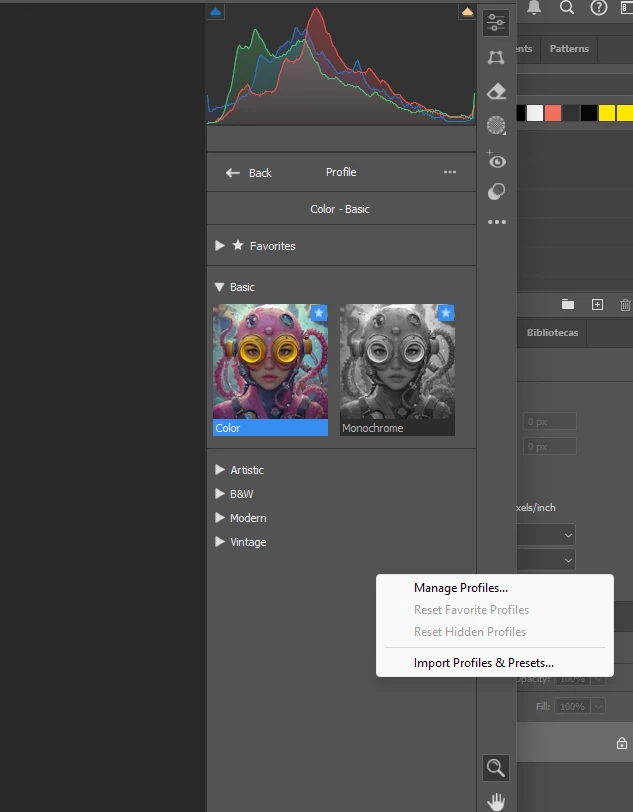
 

Correct answer Jeff Arola

Put the .xmp files in

C:\Users\UserName\AppData\Roaming\Adobe\CameraRaw\Settings

1 reply

Jeff Arola
Community Expert
Jeff ArolaCommunity ExpertCorrect answer
Community Expert
December 17, 2024

Put the .xmp files in

C:\Users\UserName\AppData\Roaming\Adobe\CameraRaw\Settings

Known Participant
January 27, 2025

Hello, 

I have another problem with loading .xmp files: each time I open Camera Raw and go into the existing saved edits to pick one it doesn`t show the original path of the presets and instead it shows me the folder in which I store my .psd / .psb / tiffs etc. and I have to manually go all the way to that C:\Users\ [...] \ Settings folder to pick up from my presets.  What should I do to have it by defalt when I enter Camera Raw?

Thanks in advance for your help!

Alex

Known Participant
January 28, 2025

Hello!
I had a similar issue when working with .xmp files in Camera Raw. One important thing I discovered is that the presets need to be saved directly in the folder:

C:\Users\[YourUsername]\AppData\Roaming\Adobe\CameraRaw\Settings

If the presets are stored in subfolders within this directory, Camera Raw might not recognize them automatically, which could explain why it shows a different default path each time.

Simply drag and drop your .xmp files directly into the Settings folder. When you open Camera Raw, they will automatically appear in their own folder within the interface.

Let me know if this helps!"


They already are saved into that folder. The only thing I created another
folder into that with some other settings which I don't use anymore.