
Participating Frequently
January 18, 2020
Answered

Problem Text is pixilated, lost custom shape tools

  • January 18, 2020
  • 2 replies
  • 403 views

With the most recent update, I have been having problems with the Text being pixilated at any resolution.

I have also lost my custom shape tool options (icon) library. They were replaced with Trees, Boats, Flowers and Wild Animals.


I have used Photoshop since '09 and have never had problems. My computer is a windows computer less than a year old.

I appreciate any suggestions you can provide.

Many Thanks,

Karen



Please notice the words NO and the text that comes after.

Thank you!

Karen
 
This topic has been closed for replies.
Correct answer Bojan Živković11378569

Try wih this regarding font issue:


  • Select type layer with problematic text in the Layers panel.
  • Activate Type Tool.
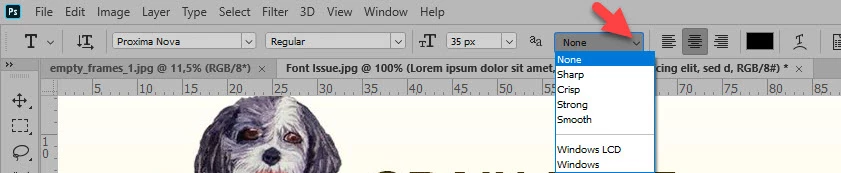
  • Check in the optios bar what is set from the 4th drop down list as shown below in screenshot. Change to Sharp to see if there is any difference in text appearance.

2 replies

Bojan Živković11378569
Community Expert
Community Expert
January 18, 2020

Try wih this regarding font issue:


  • Select type layer with problematic text in the Layers panel.
  • Activate Type Tool.
  • Check in the optios bar what is set from the 4th drop down list as shown below in screenshot. Change to Sharp to see if there is any difference in text appearance.

Participating Frequently
January 18, 2020

Thank you that worked. I appreciate all your help and quick response.

Bojan Živković11378569
Community Expert
Community Expert
January 18, 2020

Can you post some screenshot with text and problem?

There are some changes in newest Photoshop regarding shapes. Open Window > Shapes panel then click on Panel menu and choose: Legacy Shapes and More. That will load folder named Legacy Shapes and More, expand it to find shapes which are you looking for.

Participating Frequently
January 18, 2020
Thank you,
I just added an in image to my help request.

--
Thank you,
Karen

Karen Davare