
New Participant
October 12, 2017
Question

Problem with GIF saving - Dithering, I think

  • October 12, 2017
  • 3 replies
  • 4233 views

Hello to all of you!
I'm making an animated GIF, but observed a problem during the Saving.
I made others animations without any problems, but this time my GIF saving takes a blue or pink color.

I think the problem is Dithering and maybe some details are changed into the settings.

Leave you some screenshot..


The real effect would be this:


But when I saved GIF:

This is my GIF saving setting:
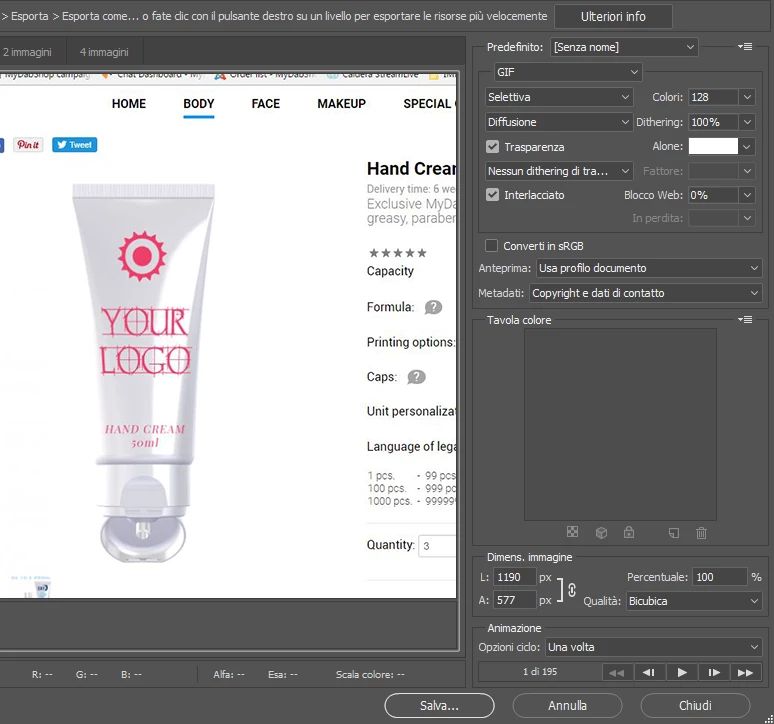
Thank you so much for your help!

Paola

This topic has been closed for replies.

3 replies

paolas87Author
New Participant
October 18, 2017

Thank you to all of you.
The problem is surely the really big size of the file. I made 195 images to make a "Full Screen" tutorial animation in GIF. (because that is the request, istead of a normal video-tutorial)
So I saved with lower resolution and frame dimension in order to have the normal colors.

For now, seems to be ok with this res. But I'll have to find if is possible to reproduce also in big size ("full screen") without colors changements.

Thank you so much for your help!

Abambo
Adobe Expert
October 18, 2017

How many images/s do you have? If you lower that, it may be that the animation passes well.

ABAMBO | Hard- and Software Engineer | Photographer
paolas87Author
New Participant
October 12, 2017

Thank you,
tried to reset the tools but still "Pink"...
I tried also to open one old PSD file about one old animation and the Saving is good.

It seems that the problem is because is too much Big Size!!!
The dimension is a "screen dimensions" 1190x557"... but if I save it like "700x.." the colors are ok!

But I'd like to have also the big dimension.

c.pfaffenbichler
Adobe Expert
October 12, 2017

The dimension is a "screen dimensions" 1190x557"... but if I save it like "700x.." the colors are ok!

Could you please post both images?

c.pfaffenbichler
Adobe Expert
October 12, 2017

Why did you set 128 colors?

Which other settings for Dithering have you tried?

paolas87Author
New Participant
October 12, 2017

Hello!
I don't know exactly actually! :-)
Because with other settings the saving is Blue (instead of pink) . I tried some different settings.
Maybe it could be possible to reset the original one? Because for other animations I didn't have this problem.

Or maybe can you send me a screenshot of your settings? (I'll try to reset like yours)
I'm afraid that is happened because I changed different settings a lot of times in order to save correctly.


Thank you!

c.pfaffenbichler
Adobe Expert
October 12, 2017

First please try 256 colors.