Participant
April 10, 2021
Answered
PROBLEMA PER LA FUNZIONE FLUIDIFICA
- April 10, 2021
- 1 reply
- 1024 views

Does turning off »Use Graphics Processor« in the Performance Preferences (Photoshop > Preferences > Performance > Graphic Processor Settings) and restarting Photoshop have any bearing on the issue?
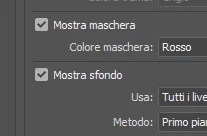
Have you tried unchecking »Show Mask« and »Show Backdrop«?
Already have an account? Login
Enter your E-mail address. We'll send you an e-mail with instructions to reset your password.
 AdChoices