
Problems rendering video from GIF (to use in Instagram)
I am trying to make a short timelapse or stopmotion video with images turned into a video to use on Instagram.
I have watched so many tutorials but they don't turn into trouble when I do...🙄
So here is my process:
- Edit 15 images in Lightroom and export in medium res. and resized to 1350 px on long edge in specific folder
2) Open Photoshop (CS5)
3) Select: Window - Workspace - Motion (this opens timeline workspace)
4) Selct: File - Open
5) Click on the first of the images in this folder (that contains all the images for the timelapse) + then select the button “Image Sequence” and press open
6) Set frame rate (in my case 3 frames per second)
7) Timeline is creating and works perfect 👍
😎 Choose: File - Save for Web & Devices
9) In save window: change file format to GIF (and looping option to forever) - SAVE
10) Test outside Photoshop to see the GIF works perfect with moving frames 👍
10) Re-open this newly saved GIF in Photoshop (due to the fact that Instagram doesn’t support GIF)
11) Press: File - Export - Render video
12) THIS IS WHERE THE TROUBLE COMES…. 😱
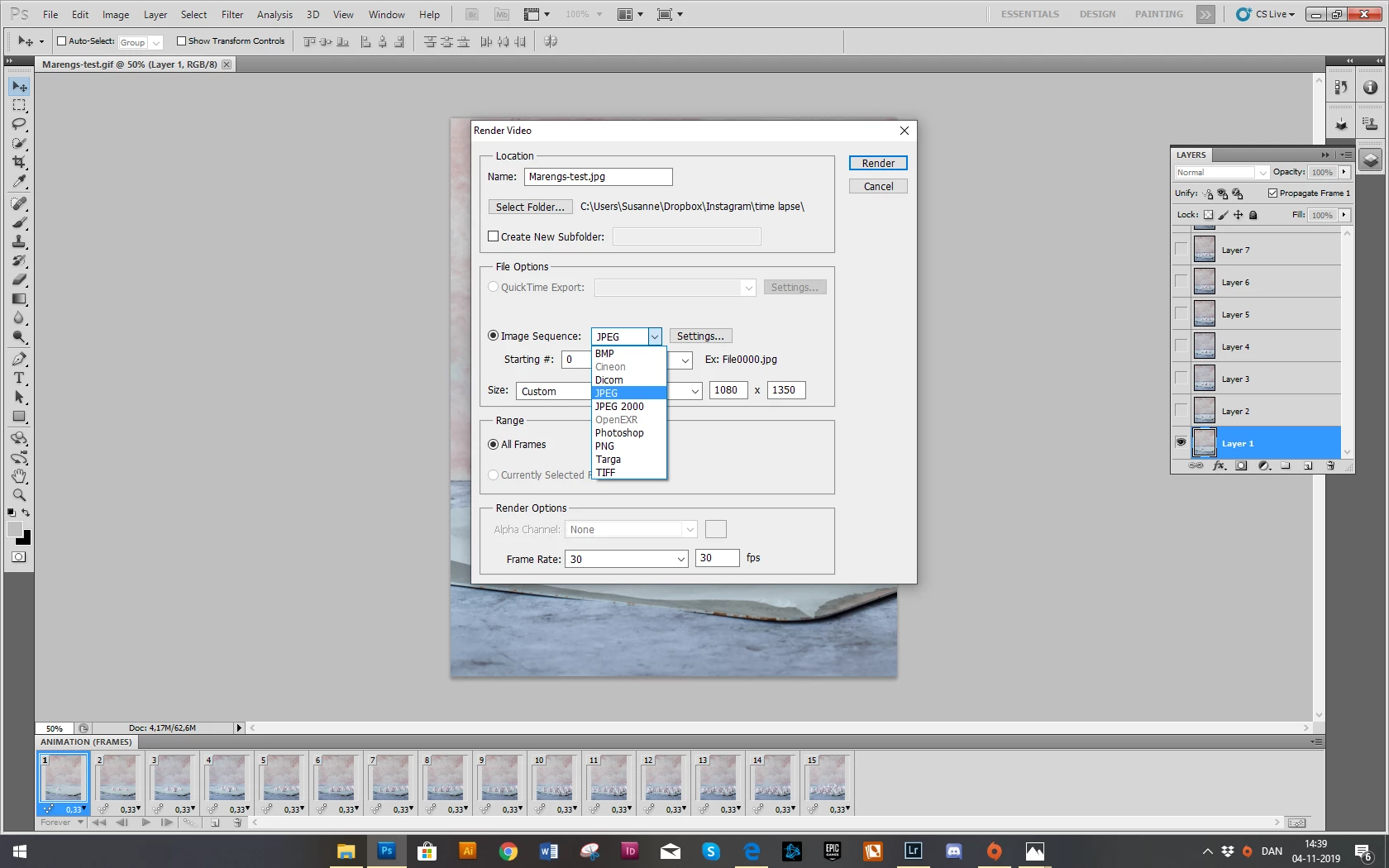
13) The “Render video saving” window doesn’t look like any other tutorial I have seen:
- My file name is .jpg (and not mp4 like in most examples I have seen)
- I can’t select the “QuickTime Export button (it’s grey indicating not being selectable)
- The only choice I have is the drop down at “Image Sequence” that can be set as: BMP; Dicom; JPEG; JPEG 2000; Photoshop; PNG; Targa; and TIFF. (see attached image)
What can I do (in Photoshop CS5, that is) to make a timelapse video to show in Instagram?
I know there are online programs to convert GIF’s to video but they create a poor quality.
Thanks to anyone who can help - truly, truly appreciated 🙌
 AdChoices