
Problems with batch processing
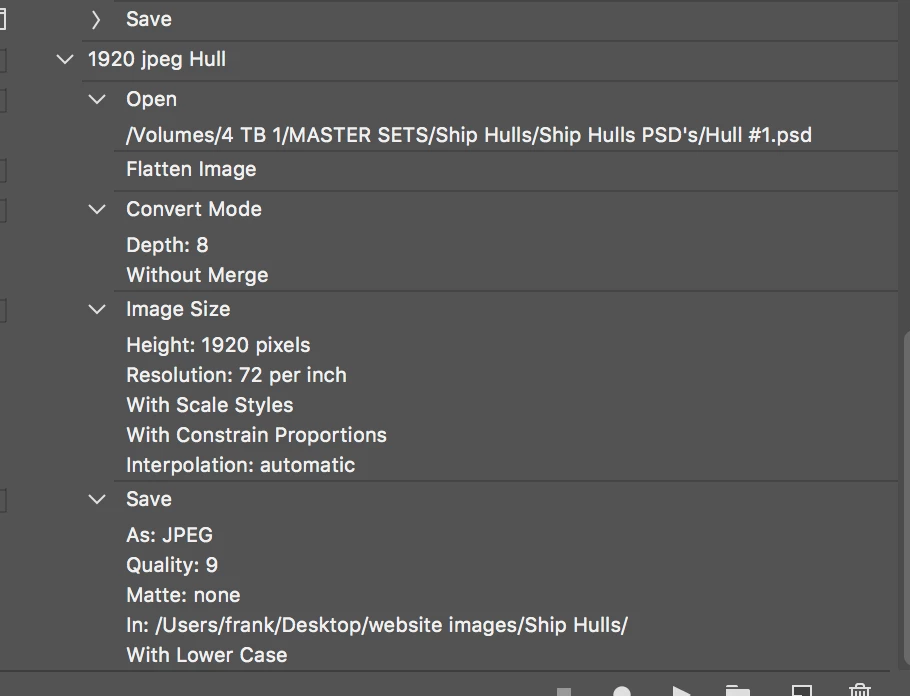
It seems like the batch command has gone crazy. I created an action to create a 1920 pxl jpeg from a larger PSD, and then save the jpeg in a particular folder. Nothing special. The source files are labeled like Image #1, #2, etc. up to #98. So, I open the batch command and point it at the correct source folder, identify the destination folder, which is the same one used in creating the Action. I do not check "override" for anything, though I've tried it that way also. Then I hit go. It then opens every file in the source folder and puts it unchanged in the destination folder. It also opens and reopens Image #1 continuously, but leaves each copy open, unsaved. It will open #1 indefinitely, until I force quit PS. This all seems a little odd. Then I tried a different source folder, same images but larger, and turned it loose again. This time it alternately opened Image #1 and Image #11 until I force quit. It would open other images in the folder if I hit cancel while it was processing #1 or #11, it would go to the next number in the sequence, do that, then try to open 1 or 11 again.
I am using the Cloud based PS on a Mac running 10.13.6
 AdChoices