Participant
June 5, 2018
Answered

Problems with Pantone colour libraries

  • June 5, 2018
  • 4 replies
  • 3167 views

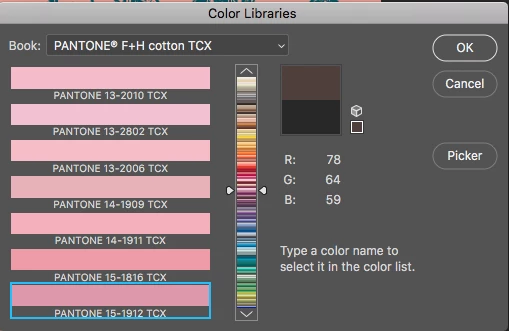
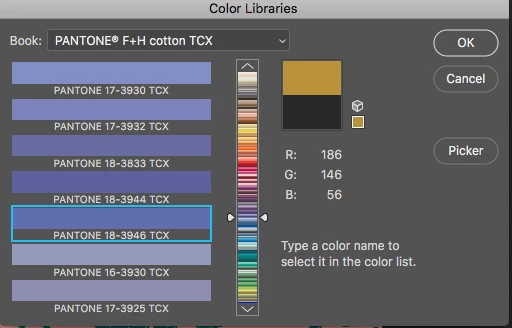
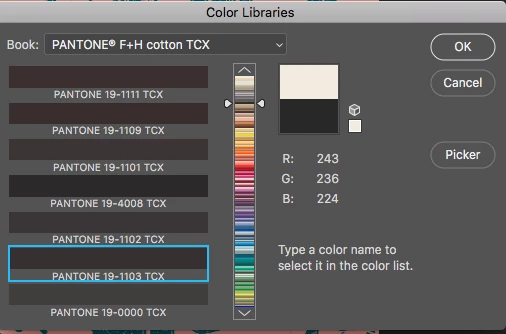
I had been using Pantone Library TCX and TPG no problem last year.  However, recently, when I go into Pantone Libraries, I pick the relevant colour for my work but it changes it to a completely different colour e.g I can pick a blue but it will appear read, or brown, or green.  The reference number doesn't change, it is just the colour that alters. This happens with a huge amount of colours.  I have gone into colour picker to see if it is just a glitch in Pantone libraries and picks the colour I want, but it picks out the incorrect colour given! See screen shot of attached.

I wonder if my settings should be something specific in Photoshop and if so, can you tell me what? I work in RGB and have changed settings and restarted and reimported the books but with no luck.  I am a real novice, so please no technical jargon I can't understand!

Thank you for any help

Angela
This topic has been closed for replies.
Correct answer nowelp91269666

Thank you for the reply gener7. I contacted pantone, and they were able to give me a better file for the color library that did not have any glitches in the color display.

For others having this issue, I would suggest contacting pantone support. They were really helpful, and fixed the issue right away.

4 replies

nowelp91269666
nowelp91269666Correct answer
Participant
May 8, 2019

Thank you for the reply gener7. I contacted pantone, and they were able to give me a better file for the color library that did not have any glitches in the color display.

For others having this issue, I would suggest contacting pantone support. They were really helpful, and fixed the issue right away.

Known Participant
May 8, 2019

Thanks for letting us know.  I will definitely contact them.

gener7
Community Expert
Community Expert
May 8, 2019

That would be 1-888-PANTONE  Extension 3 for support. They will email the files and you drop them in the Photoshop CC/Presets/Color Books folder.

nowelp91269666
Participant
May 7, 2019

I am having this same issue. Has anyone found a fix?

gener7
Community Expert
Community Expert
May 7, 2019

If you have an iphone or android, get the Pantone studio app and simply transfer the swatch values to the color picker or even make a custom swatch set of the colors you use.

gener7
Community Expert
Community Expert
December 22, 2018

It's true. The Adobe color libraries are way off and this is the workaround I can offer using the PCM. Enter the swatch number in the search box and click on the swatch to get the values.

Simply enter the html code of the Pantone color you want from the PCM. You can create a swatch library in Photoshop for commonly used favorites. The PCM is free if you registered your swatch books with Pantone and it comes in PC or Mac.

Not  the best I know, but it should do for now. Bring this issue up here so the product managers know what's going on:

Photoshop Family Customer Community

Known Participant
December 21, 2018

I am having this same issue.  Pantone claims the problem is with the latest version of Photoshop.  Is adobe aware of this issue and is there a fix in the works?  It is terribly frustrating as I depend on this feature for work.  Please advise.  thank you.