
Participant
May 10, 2022
Question

Problems with Photoshop 23.3.2

  • May 10, 2022
  • 1 reply
  • 934 views

My Photoshop (Creative Cloud) was just updated to version 23.3.2

Now it is impossible to open the application. When trying to open I only get this message on the screen:
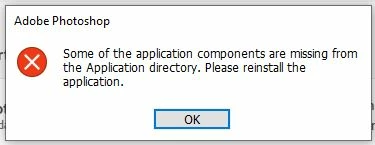
Where do I reinstall from, and how to do it without making a mess with my CC subscription?

Greetings from Norway

1 reply

Ged_Traynor
Community Expert
Community Expert
May 10, 2022

Hi

You can uninstall it from the Creative Cloud app and then just reinstall again

Participant
March 12, 2025

this doesnt work

Trevor.Dennis
Community Expert
Community Expert
March 12, 2025

It might be an operating system issue, in which case it is going to be harder to fix, but try using the Cleaner Tool and reinstalling again.


https://helpx.adobe.com/nz/creative-cloud/kb/cc-cleaner-tool-installation-problems.html


If Photoshop still refuses to install, then maybe use the Windows Health Check


System File Checker

https://support.microsoft.com/en-us/windows/using-system-file-checker-in-windows-365e0031-36b1-6031-f804-8fd86e0ef4ca