Participant
February 25, 2017
Answered

Problems with "exporting a layer to file" in photoshop cs6

  • February 25, 2017
  • 2 replies
  • 273 views

I have another problem but with photoshop CS6 and the problem is this:

When I put a gif image taken from a web page or something like that I click on "export a layer to file" and I designed that it does not have a constructor

And something that can solve it?
    This topic has been closed for replies.
    Correct answer Trevor.Dennis

    I am having some difficulty understanding your post.  If English is not your own language, use whatever language you are most comfortable with, but give us a very full description of your issue.  The more information the translator has to work with, the better the chance that we will be able to understand it.

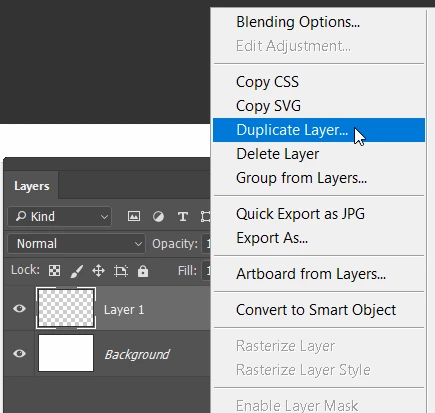
    I will hazzard a guess though.   Right click the layer, and choose Duplicate

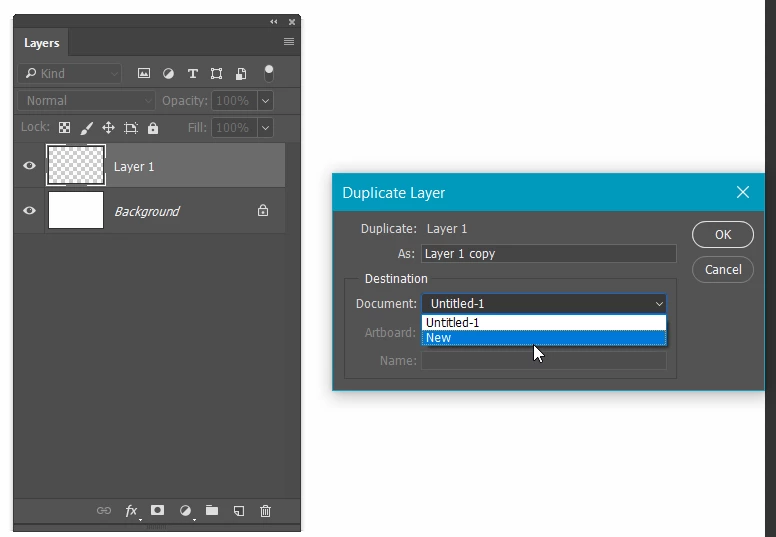
    When the window opens, use the drop-down and choose ​New  this will open a new document with your copied layer, that you can export or save to the format of choice.

    2 replies

    ScreinjaXAuthor
    Participant
    February 25, 2017

    You are, but what I wanted to tell you is that I want to save them individually and save them individually in a folder

    Trevor.Dennis
    Community Expert
    Trevor.DennisCommunity ExpertCorrect answer
    Community Expert
    February 25, 2017

    I am having some difficulty understanding your post.  If English is not your own language, use whatever language you are most comfortable with, but give us a very full description of your issue.  The more information the translator has to work with, the better the chance that we will be able to understand it.

    I will hazzard a guess though.   Right click the layer, and choose Duplicate

    When the window opens, use the drop-down and choose ​New  this will open a new document with your copied layer, that you can export or save to the format of choice.